04 · Grids: does it work on my grid?#
Tutorial 01 traced a well on a regular DIS grid. Real models often use other grids: Voronoi or quadtree DISV grids refined around wells and rivers, DISU grids from older MODFLOW-USG workflows, and XT3D for anisotropic aquifers. This tutorial shows that gwsource treats them all the same way, and where they differ.
You will:
build the tutorial aquifer of tutorial 01 on three grids: DIS, a Voronoi DISV grid and DISU;
trace the supply well with exactly the same code on each grid;
compare the capture zones side by side, and the well’s water by source in a table;
test with two more grids why the edge of the capture zone is wider on the Voronoi grid;
add XT3D with rotated anisotropy, which makes the flow go round in flow loops, read the loop report and see why the answer is still exact;
build destination and source groups from boundnames and zone arrays;
export results to GeoPackage (for GIS) and netCDF.
Runtime: about 10 seconds (the last code cell prints the measured time). Prerequisites: tutorial 01; bin/mf6 (downloaded by scripts/setup_env.py); the Python package vorflow for the Voronoi grid (in environment.yml, or pip install vorflow). gwsource itself does not need vorflow. The settings cell stops with an install hint if it is missing.
Settings#
All settings live in this first cell. Model workspaces go to tutorials/_work/04_grids/ (git-ignored, recreated on every run). The model builders and plotting helpers are in tutorials/herebedragons.py.
import sys
import time
import warnings
from pathlib import Path

import flopy
import geopandas as gpd
import matplotlib.pyplot as plt
import numpy as np
import pandas as pd
import xarray as xr
from matplotlib.colors import LogNorm

sys.path.insert(0, str(Path.cwd().parent))  # tutorials/ holds the shared helpers
import herebedragons as hbd  # noqa: E402

import gwsource as gs  # noqa: E402

START = time.perf_counter()  # the notebook prints its run time at the end
WORK = hbd.work_dir("04_grids", clean=True)  # tutorials/_work/04_grids (git-ignored)
MF6 = hbd.mf6_exe()  # <repo>/bin/mf6
WELL = "supply_well"  # boundname of the well we trace
THRESHOLDS = (0.1, 0.5)  # capture-zone contours of the fraction through
F_CAPTURE = 0.5  # capture zone: cells with F > F_CAPTURE
VORONOI_BACKGROUND = 50.0  # m, vorflow mesh size away from the well and the stream (as DIS)
VORONOI_WELL_SIZE = 10.0  # m, vorflow mesh size at the well
VORONOI_RIVER_SIZE = 12.5  # m, vorflow mesh size along the stream
VORONOI_FINE_BACKGROUND = 25.0  # m, background size of the finer Voronoi grid (section 4)
ROTATED_SIDE = 100.0 / 3.0 * np.sqrt(2.0)  # m, side of the rotated squares (half-diagonal 33.3 m)
EDGE_BAND = (0.1, 0.9)  # the edge of a capture zone: cells with 0.1 < F < 0.9
TRANSECT_X = 500.0  # m, north-south line on which the width of the edge is measured
EDGE_GRIDS = ("DIS", "DISV", "rotated squares", "DISV, 25 m")  # grids compared in section 4
ZOOM = (1150.0, 1750.0, 650.0, 1250.0)  # x0, x1, y0, y1 (m) of the close-up around the well
LAND_USE = {1: "farmland", 2: "village", 3: "woodland"}  # zone value: land use
LAND_USE_X = (700.0, 1300.0)  # m: land-use boundaries, west to east
SOURCE_LABELS = {"RCH": "recharge", "SFR": "stream leakage", "CHD": "west edge (regional inflow)"}

plt.rcParams.update({"figure.dpi": 80, "figure.figsize": (7.0, 5.5)})
vorflow = hbd.require_vorflow()  # optional dependency: only the Voronoi grid needs it
print(f"gwsource {gs.__version__}, FloPy {flopy.__version__}, vorflow {vorflow.__version__}")
gwsource 0.0.1, FloPy 3.12.0.dev0, vorflow 0.3.0
1. One aquifer, three grids#
The physical problem is the one of tutorial 01: a 2 km × 2 km unconfined aquifer with recharge, a constant-head west edge, a stream at x ≈ 1.5 km and a well pumping 800 m³/d, 100 m west of the stream. The stream is an SFR package that flows from north to south. Its bed top is 6.0 m at the north edge and falls by 0.1 m per km, so its stage stays close to 6 m. Each reach exchanges water with one aquifer cell, and the trace reads each reach as a source or sink term of its cell. The helper module builds the model on three grids:
Label |
Grid |
How it is built |
|---|---|---|
DIS |
40 × 40 regular cells of 50 m |
as in tutorial 01 |
DISV |
Voronoi cells of about 50 m, refined to about 10 m at the well and 12.5 m along the stream |
vorflow (Hugman and Sanchez 2026) meshes the domain with the well as a point and the stream as a line; the stream, the west edge and the well are placed on the cells by geometry ( |
DISU |
the DIS cells written as an unstructured grid, with cell vertices |
|
The DISU model has exactly the same cells and connections as the DIS model, so it solves the same equations. The Voronoi grid discretises the same aquifer differently.
vorflow is a Python package that builds Voronoi grids for MODFLOW 6. It first meshes the domain with triangles and then turns the triangle mesh into Voronoi cells. Away from the well and the stream, the cells are about 50 m across, as in the DIS model. They shrink to about 10 m at the well and to 12.5 m along the stream. Between the features and the rest of the domain, each cell is at most about 20 % wider than its neighbour. The well point is the centre of the well’s cell. The stream line runs through the centres of a chain of small cells.
runs = {
    "DIS": hbd.build_quickstart(WORK / "dis", MF6),
    "DISV": hbd.build_voronoi(
        WORK / "disv", MF6, background=VORONOI_BACKGROUND, well_size=VORONOI_WELL_SIZE,
        river_size=VORONOI_RIVER_SIZE,
    ),
    "DISU": hbd.build_disu(WORK / "disu", MF6),
}
for label, run in runs.items():
    print(f"{label:4s} grid file {run.grb_file.name}")
DIS  grid file quickstart.dis.grb
DISV grid file voronoi.disv.grb
DISU grid file disu.disu.grb
2. The same code on every grid#
gwsource builds its flow graph from the binary grid file’s connection arrays (IA and JA) and the FLOW-JA-FACE record of the budget file. MF6 writes both in the same form for DIS, DISV and DISU, so reading, selecting and tracing do not depend on the grid type. The loop below is the tutorial 01 trace, run unchanged on all three models:
steps, results = {}, {}
for label, run in runs.items():
    step = gs.read_step(run.ws, boundnames=True)
    well = gs.select(step, boundnames=[WELL])
    steps[label], results[label] = step, gs.backward(step, {WELL: well})
What differs between the grids is only the shape that per-cell results take when they are put back on the grid: (nlay, nrow, ncol) for DIS, (nlay, ncpl) for DISV and a flat list of nodes for DISU. The trace itself, its solver and the closure check (tutorial 01, §7) behave the same:
summary = {}
for label, step in steps.items():
    res = results[label]
    check = gs.diagnostics.backward_closure(step, res, WELL)
    summary[label] = {
        "grid type": step.grid_type,
        "result shape": step.grid_shape,
        "cells": step.n_cells,
        "solver": res.solver_used[0],
        "flow loops": len(res.cycles),
        "well inflow (m3/d)": round(res.destination_inflow[WELL], 3),
        "closure error": f"{check.relative_error:.1e}",
    }
display(pd.DataFrame(summary).T)
| grid type | result shape | cells | solver | flow loops | well inflow (m3/d) | closure error | |
|---|---|---|---|---|---|---|---|
| DIS | DIS | (1, 40, 40) | 1600 | topological | 0 | 800.0 | 1.4e-16 |
| DISV | DISV | (1, 3241) | 3241 | topological | 0 | 800.0 | 0.0e+00 |
| DISU | DISU | (1600,) | 1600 | topological | 0 | 800.0 | 1.4e-16 |
The trace works the same on every grid, but some outputs need more than the flow graph. Maps and GeoPackage export need the cell outlines. Flux outputs and travel times need the cell areas. The table lists what works on each grid type:
Feature |
DIS |
DISV |
DISU |
|---|---|---|---|
Fractions, volumes, forward/backward, statistics, diagnostics |
yes |
yes |
yes |
Flux outputs, travel time (need cell area) |
yes |
yes |
yes |
Maps ( |
yes |
yes |
yes |
netCDF and npz |
|
|
|
Particle comparison with MF6 PRT (tutorial 06) |
yes |
yes |
no (PRT supports DIS and DISV only) |
DISU has no layers. Per-layer maps of a layered DISU model therefore need a layer number for each node from you.
3. Capture zones side by side#
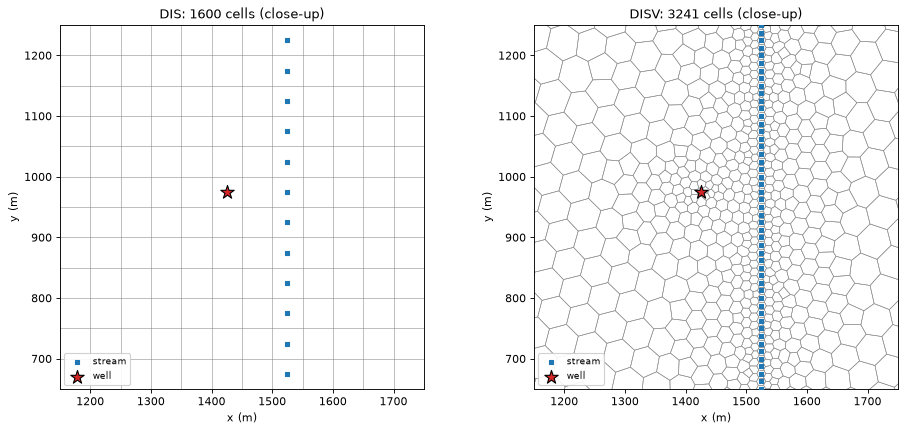
First a close-up of the two different cell layouts around the well and the stream. On the Voronoi grid the cells get smaller towards the well and the stream. The Voronoi stream is the chain of small cells that the stream line crosses. Their centres lie on the stream line, as the centres of the DIS stream column do.
fig, axes = plt.subplots(1, 2, figsize=(12.0, 5.5))
for ax, label in zip(axes, ("DIS", "DISV")):
    run = runs[label]
    pmv = flopy.plot.PlotMapView(modelgrid=hbd.model_grid(run.grb_file), ax=ax)
    pmv.plot_grid(linewidth=0.5, color="0.55")
    hbd.overlay_features(ax, run.grb_file, steps[label], packages=("SFR", "WEL"))
    ax.set_xlim(ZOOM[:2])
    ax.set_ylim(ZOOM[2:])
    ax.set_aspect("equal")
    ax.set_xlabel("x (m)")
    ax.set_ylabel("y (m)")
    ax.set_title(f"{label}: {steps[label].n_cells} cells (close-up)")
fig.tight_layout()
plt.show()
Now the fraction through \(F\) on each grid, with the \(F = 0.1\) (dashed) and \(F = 0.5\) (solid) contours of tutorial 01.
fig, axes = plt.subplots(1, 3, figsize=(17.0, 5.0))
for ax, label in zip(axes, runs):
    run, step, F = runs[label], steps[label], results[label].fraction_through[WELL]
    hbd.plot_cells(
        run.grb_file, step, F, ax=ax, cmap="viridis", vmin=0.0, vmax=1.0,
        title=f"{label}: fraction through", label="F (-)",
    )
    hbd.add_contours(ax, run.grb_file, step, F, THRESHOLDS, colors="w", linestyles=["--", "-"])
fig.tight_layout()
plt.show()
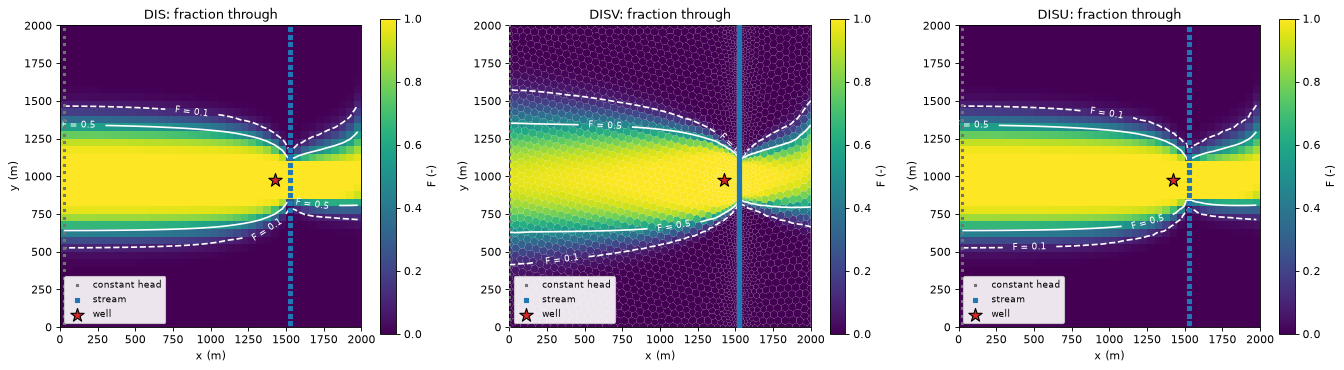
The DISU map is the DIS map, cell for cell. The Voronoi capture zone has the same shape and reach (back to the west edge, a tail across the stream), with a slightly different outline. Its cells are differently shaped and oriented, and the notebook reads the different outline as full mixing smearing the zone edge a little differently on them. Numerical dispersion of full mixing is not smaller on Voronoi grids (tutorial 11, section 2).
4. The well’s water by source on each grid#
The table gives each source’s share of the pumped water, two capture areas, and the largest difference in \(F\) from the DIS result. The last column is only meaningful for DISU, which has the same cells as DIS. The two areas measure different things:
the expected area \(\sum_i F_i A_i\) counts each cell’s area \(A_i\) in proportion to the share \(F_i\) of its water that reaches the well. It needs no threshold.
the area with \(F > 0.5\) counts the whole area of every cell that sends more than half its water to the well, and nothing of the other cells.
The cell under the table prints how far each DISV value is from the DIS value, as a relative difference.
rows = {}
for label, res in results.items():
    table = hbd.volume_from_table(res, WELL)
    row = {SOURCE_LABELS[name]: share for name, share in table["share"].items()}
    F, area = res.fraction_through[WELL], steps[label].area
    row["expected area sum(F A) (km2)"] = float(F @ area) / 1e6
    row[f"area F > {F_CAPTURE} (km2)"] = area[F > F_CAPTURE].sum() / 1e6
    if steps[label].n_cells == steps["DIS"].n_cells:
        row["max |F - F_DIS|"] = np.abs(res.fraction_through[WELL] - results["DIS"].fraction_through[WELL]).max()
    rows[label] = row
shares = pd.DataFrame(rows).T
formats = {**{c: "{:.3f}" for c in shares.columns}, "max |F - F_DIS|": "{:.1e}"}
display(shares.apply(lambda col: col.map(lambda v: "–" if np.isnan(v) else formats[col.name].format(v))))
change = shares.loc["DISV"] / shares.loc["DIS"] - 1.0
print("DISV vs DIS:", ", ".join(f"{name} {change[name]:+.1%}" for name in shares.columns[:-1]))
| recharge | west edge (regional inflow) | stream leakage | expected area sum(F A) (km2) | area F > 0.5 (km2) | max |F - F_DIS| | |
|---|---|---|---|---|---|---|
| DIS | 0.707 | 0.153 | 0.140 | 1.167 | 1.147 | 0.0e+00 |
| DISV | 0.723 | 0.139 | 0.138 | 1.171 | 1.182 | – |
| DISU | 0.707 | 0.153 | 0.140 | 1.167 | 1.147 | 0.0e+00 |
DISV vs DIS: recharge +2.2%, west edge (regional inflow) -9.3%, stream leakage -0.8%, expected area sum(F A) (km2) +0.3%, area F > 0.5 (km2) +3.0%
DIS and DISU are identical to machine precision: same cells, same connections, same flows, same answer.
DISV is close but not equal. The expected area is 0.3 % larger and the area with \(F > 0.5\) is 3.0 % larger. The stream supplies 14 % of the well’s water on both grids. The west edge supplies 14 % instead of 15 %, and recharge supplies 72 % instead of 71 %. We read these differences as differences between the two models rather than in the tracing. The next cell prints the boundary placement behind that reading.
for label in ("DIS", "DISV"):
    run, step, res = runs[label], steps[label], results[label]
    centres = gs.export.cell_centres(run.grb_file)
    well_xy = centres[np.flatnonzero(res.selections[WELL].cells)[0]]
    stream = hbd.feature_cells(step, "SFR")
    gap = np.hypot(*(centres[stream] - well_xy).T).min()
    sfr = gs.select(step, package="SFR").terms
    leakage = step.term_flow[sfr & (step.term_flow > 0)].sum()
    to_well = res.volume_from_by_term[WELL]["SFR"].sum()
    print(
        f"{label:4s}: well cell centre at x = {well_xy[0]:6.1f} m, nearest stream cell centre "
        f"{gap:5.1f} m away; stream leakage {leakage:5.1f} m3/d, of which {to_well:5.1f} reaches the well"
    )
    chd = gs.select(step, package="CHD")
    print(
        f"      west edge: {chd.cells.sum()} constant-head cells with centres at x = "
        f"{centres[chd.cells, 0].max():4.1f} m, area {step.area[chd.cells].sum() / 1e6:.3f} km2; "
        f"regional inflow {step.term_flow[chd.terms].sum():5.1f} m3/d"
    )
DIS : well cell centre at x = 1425.0 m, nearest stream cell centre 100.0 m away; stream leakage 111.7 m3/d, of which 111.7 reaches the well
      west edge: 40 constant-head cells with centres at x = 25.0 m, area 0.100 km2; regional inflow 338.0 m3/d
DISV: well cell centre at x = 1425.0 m, nearest stream cell centre 100.0 m away; stream leakage 110.8 m3/d, of which 110.8 reaches the well
      west edge: 41 constant-head cells with centres at x =  0.0 m, area 0.041 km2; regional inflow 303.8 m3/d
On both grids the well’s cell is centred on the well, and the stream cells are centred on the stream line. The nearest stream cell centre is therefore 100 m from the well’s cell centre on both grids. The stream leakage differs by 0.8 % (110.8 against 111.7 m³/d). In both models all the stream leakage reaches the well, so every losing reach is inside the capture zone.
The west edge is placed differently. The DIS constant-head cells are the first column of 50 m cells, with their centres 25 m inside the edge. The Voronoi constant-head cells are narrow cells with their centres on the edge itself. They cover 0.041 km² instead of 0.100 km². We read the smaller regional inflow on DISV (304 against 338 m³/d) as an effect of this placement. We expect two causes. The fixed head lies 25 m further from the well. Recharge on the strip that is part of the DIS constant-head cells enters the Voronoi aquifer instead. This is a reading of the printed numbers, not a test. The notebook does not move the west edge alone to check it.
When you compare a capture zone between two grids, first check how each grid places the boundaries. Here the two grids place the stream and the well in the same way, and the stream shares agree. They place the west edge differently, and the share from the west edge differs most.
Why is the edge of the zone wider on the Voronoi grid?#
The two grids agree on the size of the zone. The expected areas differ by 0.3 %. The edge of the zone differs more. In the maps of section 3, the band between the \(F = 0.1\) and \(F = 0.5\) contours is wider on the Voronoi grid.
We test one reading of this. On the regular grid, the water flows almost exactly along the rows, from west to east. Each cell then sends nearly all its water across one face, to the cell east of it. The faces of the Voronoi cells lie at many angles. Each Voronoi cell therefore splits its water between two or three downstream cells. Full mixing passes the well’s share of the water to every downstream cell. So every split moves a little of that share sideways. Over many cells, this widens the edge of the zone. This spreading comes from the grid, not from the aquifer. It is a form of numerical dispersion. The size of the cells matters too. In the tests of tutorial 11, the edge narrowed as about the square root of the cell size.
Two more grids of the same model test the reading:
Rotated squares. Square cells turned by 45° to the flow. The water flows along the diagonal of each square, so each cell splits its water between two downstream faces. One square is centred on the well. The squares are 47.1 m wide. At that size the stream line, 100 m east of the well, runs through a column of cell centres. The squares are therefore a little smaller than the 50 m cells of the regular grid (
hbd.build_rotated_squares).Voronoi, 25 m. The Voronoi grid of section 1 with cells of about 25 m instead of 50 m away from the well and the stream. The refinement at the well and along the stream is the same.
On both grids, the stream, the well and the west edge are placed on the cells by the same rules as on the 50 m Voronoi grid. If the reading holds, the rotated squares give a wider edge than the regular grid, although their cells are smaller. The finer Voronoi grid gives a narrower edge than the 50 m Voronoi grid.
for label, run in {
    "rotated squares": hbd.build_rotated_squares(WORK / "rotated", MF6, side=ROTATED_SIDE),
    "DISV, 25 m": hbd.build_voronoi(
        WORK / "disv_25m", MF6, background=VORONOI_FINE_BACKGROUND, well_size=VORONOI_WELL_SIZE,
        river_size=VORONOI_RIVER_SIZE,
    ),
}.items():
    step = gs.read_step(run.ws, boundnames=True)
    runs[label], steps[label] = run, step
    results[label] = gs.backward(step, {WELL: gs.select(step, boundnames=[WELL])})
    print(f"{label:16s} {step.n_cells:5d} cells, {len(run.info['stream_cells'])} stream cells, "
          f"{len(run.info['chd_cells'])} constant-head cells")
rotated squares 1921 cells, 31 stream cells, 61 constant-head cells
DISV, 25 m 8256 cells, 161 stream cells, 81 constant-head cells
We measure the edge in two ways:
the area of the edge band, the summed area of the cells with \(0.1 < F < 0.9\). These are the cells that send part, but not most, of their water to the well.
the width of the edge north of the well, along the north–south line \(x\) = 0.5 km. Along that line, \(F\) is interpolated linearly between the cell centres. The width is the distance from where \(F\) falls to 0.5 to where it falls to 0.1.
y = np.arange(0.0, runs["DIS"].spec.ly, 1.0)  # m, points along the line x = TRANSECT_X
profiles, edge_rows = {}, {}
for label in EDGE_GRIDS:
    step, F = steps[label], results[label].fraction_through[WELL]
    centres = gs.export.cell_centres(runs[label].grb_file)
    profiles[label] = hbd.transect_profile(centres, F, TRANSECT_X, y)
    y_half, y_tenth, width = hbd.band_width_north(y, profiles[label], *THRESHOLDS)
    edge_rows[label] = {
        "cells": step.n_cells,
        "expected area (km2)": float(F @ step.area) / 1e6,
        f"area F > {F_CAPTURE} (km2)": step.area[F > F_CAPTURE].sum() / 1e6,
        "edge band area (km2)": hbd.edge_band_area(F, step.area, *EDGE_BAND) / 1e6,
        "y at F = 0.5 (m)": y_half,
        "y at F = 0.1 (m)": y_tenth,
        "edge width (m)": width,
    }
edges = pd.DataFrame(edge_rows).T
formats = {"cells": "{:.0f}", "expected area (km2)": "{:.3f}", f"area F > {F_CAPTURE} (km2)": "{:.3f}",
           "edge band area (km2)": "{:.2f}", "y at F = 0.5 (m)": "{:.0f}", "y at F = 0.1 (m)": "{:.0f}",
           "edge width (m)": "{:.0f}"}
display(edges.apply(lambda col: col.map(formats[col.name].format)))
| cells | expected area (km2) | area F > 0.5 (km2) | edge band area (km2) | y at F = 0.5 (m) | y at F = 0.1 (m) | edge width (m) | |
|---|---|---|---|---|---|---|---|
| DIS | 1600 | 1.167 | 1.147 | 0.73 | 1332 | 1456 | 124 |
| DISV | 3241 | 1.171 | 1.182 | 1.01 | 1340 | 1527 | 187 |
| rotated squares | 1921 | 1.167 | 1.188 | 1.25 | 1340 | 1554 | 214 |
| DISV, 25 m | 8256 | 1.170 | 1.171 | 0.76 | 1339 | 1465 | 126 |
The maps show \(F\) on the two new grids, with the line \(x\) = 0.5 km in red. The right panel shows \(F\) along that line on all four grids, north of the well.
fig, axes = plt.subplots(1, 3, figsize=(17.0, 5.0))
for ax, label in zip(axes[:2], ("rotated squares", "DISV, 25 m")):
    run, step, F = runs[label], steps[label], results[label].fraction_through[WELL]
    hbd.plot_cells(
        run.grb_file, step, F, ax=ax, cmap="viridis", vmin=0.0, vmax=1.0,
        title=f"{label}: fraction through", label="F (-)", edgecolor="0.3", linewidth=0.1,
    )
    hbd.add_contours(ax, run.grb_file, step, F, THRESHOLDS, colors="w", linestyles=["--", "-"])
    ax.axvline(TRANSECT_X, color="tab:red", linewidth=1.5, zorder=4)
for label in EDGE_GRIDS:
    axes[2].plot(y, profiles[label], label=f"{label} ({edges.loc[label, 'edge width (m)']:.0f} m)")
for level in THRESHOLDS:
    axes[2].axhline(level, color="0.6", linestyle=":", linewidth=1.0)
axes[2].set_xlim(1200.0, 1700.0)
axes[2].set_ylim(0.0, 1.02)
axes[2].set_xlabel("y (m), along x = 500 m")
axes[2].set_ylabel("F (-)")
axes[2].set_title("F north of the well (edge width in brackets)")
axes[2].legend(fontsize=8)
fig.tight_layout()
plt.show()
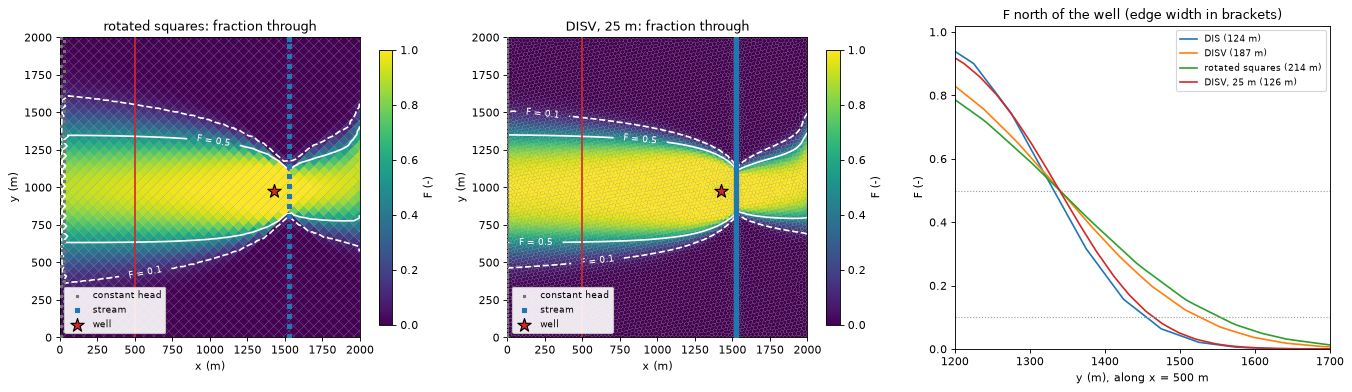
The rotated squares give the widest edge. Along \(x\) = 0.5 km, \(F\) falls from 0.5 to 0.1 over 214 m. On the regular grid it falls over 124 m. The edge band of the rotated squares covers 1.25 km², against 0.73 km² on the regular grid. The rotated squares are also 6 % narrower than the regular cells. Smaller cells give a narrower edge, not a wider one. We therefore attribute the wider edge to the angle between the faces and the flow. The edge is about 1.7 times as wide as on the regular grid. The 50 m Voronoi grid lies between the two, at 187 m and 1.01 km². Its faces lie at many angles to the flow. We read its wider edge as an effect of those angles.
The finer Voronoi grid narrows the edge from 187 m to 126 m. Its edge band shrinks from 1.01 km² to 0.76 km². Halving the background cell size made the edge 0.67 times as wide. The square root of 0.5 is 0.71. The result therefore agrees with the square-root rule that tutorial 11 measures. With 25 m cells, the Voronoi edge is about as narrow as the edge on the 50 m regular grid.
The size of the zone changes much less than its edge. The expected areas of the four grids lie within 0.5 % of each other, from 1.167 to 1.171 km². The areas with \(F > 0.5\) lie within 4 %, from 1.147 to 1.188 km².
The check supports the reading. The edge of a full-mixing zone is wider when the cell faces lie at an angle to the flow than when they are aligned with it. Smaller cells narrow the edge. The check uses one model and one line across the edge. On the 50 m Voronoi grid it does not separate the angle of the faces from the varying cell size. Tutorial 11 measures numerical dispersion on two test problems with references that do not mix.
5. XT3D: flow loops#
With MF6’s standard two-point flux, the flow between two connected cells is proportional to their head difference, so water always moves from the higher to the lower head. Going round a loop would mean going downhill all the way back to the start, which is impossible. The flow graph then has no flow loops, and the solver can use topological substitution (the topological solver in the table of section 2).
XT3D computes the flow across a face from the heads of the surrounding cells as well. That is what makes it accurate for anisotropy that is not aligned with the grid, but it also means the flow across a face can run against the head difference of the two cells it joins. Flow loops then become possible. hbd.build_xt3d builds the tutorial aquifer with a heterogeneous log-normal \(K\), 20:1 horizontal anisotropy and principal axes that rotate across the domain, solved with XT3D:
xt3d = hbd.build_xt3d(WORK / "xt3d", MF6)
step_x = gs.read_step(xt3d.ws, boundnames=True)
res_x = gs.backward(step_x, {WELL: gs.select(step_x, boundnames=[WELL])})
print(f"solver: {res_x.solver_used[0]}, flow loops: {len(res_x.cycles)}")
print(f"water entering the well: {res_x.destination_inflow[WELL]:.1f} m3/d")
display(hbd.volume_from_table(res_x, WELL).rename(index=SOURCE_LABELS).round(3))
solver: block, flow loops: 5
water entering the well: 800.0 m3/d
| volume_from | share | |
|---|---|---|
| source | ||
| stream leakage | 509.707 | 0.637 |
| recharge | 290.293 | 0.363 |
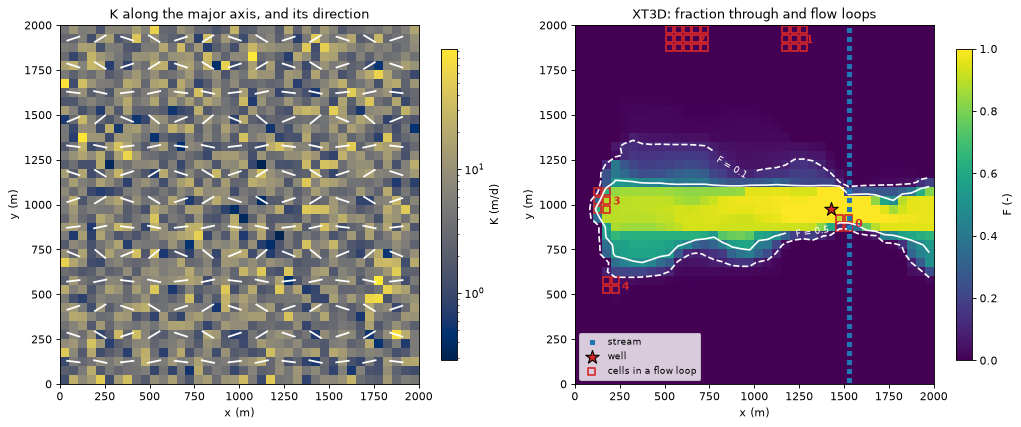
The well’s capture zone and sources are very different from the homogeneous model. Here most of the water comes from the stream. The notebook attributes this to the heterogeneous, anisotropic \(K\) field rather than to XT3D or the flow loops, which carry little water (see the loop report below). The left map shows \(K\) along the major axis with the direction of that axis. The right map shows \(F\) and outlines the cells of every flow loop.
spec = xt3d.spec
cycles = gs.diagnostics.cycle_report(step_x, res_x)
cycle_id = gs.diagnostics.cycle_ids(step_x.n_cells, cycles)
centres = gs.export.cell_centres(xt3d.grb_file)

fig, axes = plt.subplots(1, 2, figsize=(13.0, 5.2))
hbd.plot_cells(
    xt3d.grb_file, step_x, xt3d.info["k"].ravel(), ax=axes[0], cmap="cividis",
    norm=LogNorm(), title="K along the major axis, and its direction", label="K (m/d)", overlay=False,
)
angle = np.radians(xt3d.info["angle1"].ravel())
rows, cols = np.divmod(np.arange(step_x.n_cells), spec.ncol)
every = (rows % 3 == 1) & (cols % 3 == 1)  # one direction bar per 3 x 3 cells
axes[0].quiver(
    centres[every, 0], centres[every, 1], np.cos(angle[every]), np.sin(angle[every]),
    pivot="middle", headwidth=0, headlength=0, headaxislength=0, scale=25, color="w", width=0.005,
)
hbd.plot_cells(
    xt3d.grb_file, step_x, res_x.fraction_through[WELL], ax=axes[1], cmap="viridis", vmin=0.0,
    vmax=1.0, title="XT3D: fraction through and flow loops", label="F (-)", overlay=False,
)
hbd.add_contours(axes[1], xt3d.grb_file, step_x, res_x.fraction_through[WELL], THRESHOLDS, colors="w", linestyles=["--", "-"])
hbd.overlay_features(axes[1], xt3d.grb_file, step_x, packages=("SFR", "WEL"), legend=False)
in_cycle = cycle_id >= 0
axes[1].scatter(
    centres[in_cycle, 0], centres[in_cycle, 1], marker="s", s=40, facecolors="none",
    edgecolors="tab:red", linewidths=1.5, label="cells in a flow loop",
)
for i, c in enumerate(cycles):
    x, y = centres[c.cells].mean(axis=0)
    axes[1].annotate(str(i), (x, y), xytext=(10, -4), textcoords="offset points", color="tab:red", fontweight="bold")
axes[1].legend(loc="lower left", fontsize=8)
fig.tight_layout()
plt.show()
The loop report#
gs.diagnostics.cycle_report lists every strongly connected set of the flow graph: a group of cells in which water can get from any cell to any other, and so round and back again. Each such set holds one or more flow loops. Each row of the report gives
n_cellsandinternal_flow: the size of the set and the sum of the flows on the connections inside it;min_edge_flow: the smallest of those flows (the one the reference method would delete, see below);circulation: how much water goes round. It is found by repeatedly taking out the smallest flow around a loop until no loop is left.circulating_throughflow: the same water counted cell by cell. Water that goes round a loop of five cells passes through each of the five. So 1 m³/d of circulation adds 5 m³/d to the summed throughflow of the cells. This column is circulation × loop length.throughflow_share: the circulating throughflow as a share of the model’s total throughflow (the summed outflow of all cells).closed: whether the set has no exit at all. Water in a closed set can never reach any sink, sogwsourcesets its fractions to 0 and reports it.
A second table says where each set is: the centre of its cells, the distance of that centre from the well cell, and the smallest and largest \(F\) of its cells.
report = pd.DataFrame(gs.diagnostics.cycle_table(cycles)).set_index("cycle").rename_axis("set")
formats = {"internal_flow": "{:.2f}", "min_edge_flow": "{:.3f}", "circulation": "{:.3f}",
           "circulating_throughflow": "{:.2f}", "throughflow_share": "{:.1e}"}
display(report.drop(columns="cells").apply(lambda col: col.map(formats[col.name].format) if col.name in formats else col))

well_xy = centres[np.flatnonzero(res_x.selections[WELL].cells)[0]]
F_x = res_x.fraction_through[WELL]
where = pd.DataFrame({
    i: {"centre x (m)": centres[c.cells, 0].mean(), "centre y (m)": centres[c.cells, 1].mean(),
        "distance to well (m)": np.hypot(*(centres[c.cells].mean(axis=0) - well_xy)),
        "min F": F_x[c.cells].min(), "max F": F_x[c.cells].max()}
    for i, c in enumerate(cycles)
}).T.rename_axis("set")
display(where.round({"centre x (m)": 0, "centre y (m)": 0, "distance to well (m)": 0, "min F": 3, "max F": 3}))
total_throughflow = report["circulating_throughflow"].sum() / report["throughflow_share"].sum()  # m3/d
print(f"{in_cycle.sum()} of {step_x.n_cells} cells are in a flow loop.")
print(f"{report['circulation'].sum():.2f} m3/d circulates around the loops "
      f"({report['circulation'].sum() / total_throughflow:.1e} of the model throughflow).")
print(f"Counted cell by cell, the circulating throughflow is {report['circulating_throughflow'].sum():.1f} m3/d "
      f"({report['throughflow_share'].sum():.1e} of the model throughflow).")
csv_path = gs.export.save_cycle_report(WORK / "xt3d_cycles.csv", cycles)
print("loop report written to", csv_path.name)
| n_cells | internal_flow | min_edge_flow | circulation | circulating_throughflow | throughflow_share | closed | |
|---|---|---|---|---|---|---|---|
| set | |||||||
| 0 | 4 | 43.22 | 2.338 | 2.338 | 9.35 | 3.4e-04 | False |
| 1 | 9 | 232.00 | 0.479 | 1.769 | 10.62 | 3.8e-04 | False |
| 2 | 15 | 117.27 | 0.119 | 0.119 | 1.19 | 4.3e-05 | False |
| 3 | 6 | 3.33 | 0.035 | 0.068 | 0.27 | 9.8e-06 | False |
| 4 | 4 | 0.62 | 0.008 | 0.008 | 0.03 | 1.2e-06 | False |
| centre x (m) | centre y (m) | distance to well (m) | min F | max F | |
|---|---|---|---|---|---|
| set | |||||
| 0 | 1500.0 | 900.0 | 106.0 | 0.126 | 0.951 |
| 1 | 1225.0 | 1925.0 | 971.0 | 0.000 | 0.000 |
| 2 | 625.0 | 1925.0 | 1242.0 | 0.000 | 0.000 |
| 3 | 150.0 | 1025.0 | 1276.0 | 0.041 | 0.893 |
| 4 | 200.0 | 550.0 | 1297.0 | 0.000 | 0.032 |
38 of 1600 cells are in a flow loop.
4.30 m3/d circulates around the loops (1.5e-04 of the model throughflow).
Counted cell by cell, the circulating throughflow is 21.5 m3/d (7.7e-04 of the model throughflow).
loop report written to xt3d_cycles.csv
The sets are small (4 to 15 cells). Little water goes round in them. In total 4.3 m³/d circulates around the loops, 0.015 % of the model throughflow. Counted cell by cell, the circulating throughflow is 21.5 m³/d, 0.08 % of the model throughflow. Two measures of size give different rankings:
Circulation is largest in set 0 (2.3 m³/d), about 100 m from the well.
Internal flow is largest in set 1 (232 m³/d). Only 1.8 m³/d of that goes round. The rest passes through the set on its way to a sink.
Sets 3 and 4 lie near the west boundary, about 1.3 km from the well. The cells of set 3 span the edge of the capture zone, with \(F\) from 0.04 to 0.89. Set 4 lies just outside the zone, with \(F\) of at most 0.03. Sets 1 and 2 lie at the north edge (y ≈ 1.9 km), where \(F = 0\). They are outside the capture zone. Large or strong flow loops would deserve a look at the model itself (solver convergence, extreme anisotropy).
Which solver, and why the answer is still exact#
Backward tracing solves the linear system \((\mathbf I - \mathbf P)\,\mathbf F = \mathbf S\,\mathbf D\) of tutorial 01. A flow loop does not change the equations. It only means the matrix cannot be reordered into triangular form, so substitution cell by cell is not possible. The default solver (auto) then switches to the block solver: it orders the strongly connected sets so that every set comes after the cells it drains to, and factorises the system in that order with a sparse LU. Each strongly connected set becomes a small block that is solved simultaneously. Every other cell is still solved by substitution. The result is the exact solution of the full-mixing equations, which three checks confirm:
groups_x = {WELL: gs.select(step_x, boundnames=[WELL])}
lu = gs.backward(step_x, groups_x, gs.TraceConfig(solver="lu"))
print(f"block vs plain sparse LU of the whole matrix: max |dF| = "
      f"{np.abs(lu.fraction_through[WELL] - res_x.fraction_through[WELL]).max():.1e}")
check = gs.diagnostics.backward_closure(step_x, res_x, WELL)
print(f"closure: sum of volume from {check.lhs:.4f} m3/d vs pumping {check.rhs:.4f} m3/d "
      f"(relative error {check.relative_error:.1e})")
try:
    gs.backward(step_x, groups_x, gs.TraceConfig(solver="topological"))
except AssertionError as err:
    print("topological solver:", err)
block vs plain sparse LU of the whole matrix: max |dF| = 3.3e-16
closure: sum of volume from 800.0000 m3/d vs pumping 800.0000 m3/d (relative error 0.0e+00)
topological solver: the flow graph has cycles; the topological solver cannot be used (use 'auto' or 'block')
The reference method (Foley and Black 2013) handles flow loops differently. It deletes the smallest connection of each loop until the graph has none, then uses topological substitution. That changes the flow field (the cells next to a deleted connection no longer balance) and so the answer. gwsource keeps that behaviour only in net mode (accounting="net", remove_cycles=True), for comparison with studies made with the reference method. On this model the difference from the exact net-mode solution is:
net_exact = gs.backward(step_x, groups_x, gs.TraceConfig(accounting="net"))
net_deleted = gs.backward(step_x, groups_x, gs.TraceConfig(accounting="net", remove_cycles=True))
delta = np.abs(net_deleted.fraction_through[WELL] - net_exact.fraction_through[WELL])
print(f"net mode, solver {net_exact.solver_used[0]} vs edges deleted ({net_deleted.solver_used[0]}): "
      f"max |dF| = {delta.max():.3f}, in {np.sum(delta > 0.01)} cells above 0.01")
net mode, solver block vs edges deleted (topological): max |dF| = 0.141, in 21 cells above 0.01
Deleting a few m³/d of flow shifts \(F\) by up to about 0.14, and by more than 0.01 in about twenty cells around the flow loops that touch the capture zone. It is a local error. It is also avoidable, and with strong flow loops it would grow. Gross accounting (the default) has no edge deletion at all. Tutorial 02 covers gross vs net accounting.
6. Groups from boundnames and zone arrays#
So far the destination was one well, picked by its boundname. Two selectors build groups from model features in bulk, and both work on any grid. We use the Voronoi model here.
Boundnames: one group per stretch of the stream#
The stream reaches carry the boundnames stream_north and stream_south. gs.groups_by_boundname(step, package="SFR") makes one group per boundname of the stream package. Traced together with the well, the three groups answer “which outlet does the water of each cell leave through?”
step_v = steps["DISV"]
reaches = gs.groups_by_boundname(step_v, package="SFR")
outlets = {WELL: gs.select(step_v, boundnames=[WELL]), **reaches}
res_v = gs.backward(step_v, outlets)
for name in outlets:
    print(f"{name:12s}: {outlets[name].terms.sum():3d} terms, takes {res_v.destination_inflow[name]:7.1f} m3/d")

run_v = runs["DISV"]
fig, axes = plt.subplots(1, 3, figsize=(16.0, 4.8))
for ax, name in zip(axes, outlets):
    hbd.plot_cells(
        run_v.grb_file, step_v, res_v.fraction_through[name], ax=ax, cmap="viridis", vmin=0.0,
        vmax=1.0, title=f"F to {name}", label="F (-)", overlay=False,
    )
    hbd.overlay_features(ax, run_v.grb_file, step_v, packages=("SFR", "WEL"), legend=False)
fig.tight_layout()
plt.show()
supply_well :   1 terms, takes   800.0 m3/d
stream_north:  80 terms, takes   806.7 m3/d
stream_south:  81 terms, takes   787.3 m3/d
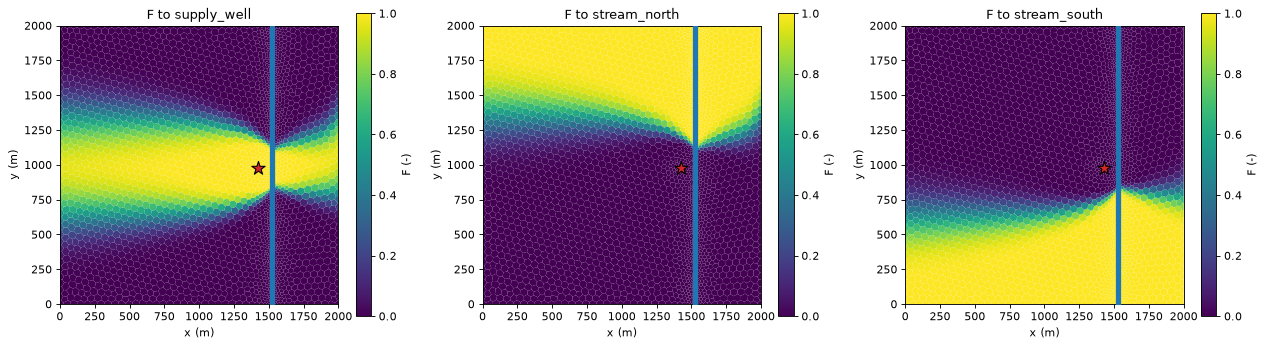
The well and the two stretches of the stream are the only sinks in the model (the constant-head edge only supplies water), so every drop leaves through one of the three. Their fractions therefore add up to 1 in every cell: a boundary-control map (tutorial 02). The north and south stretches split the aquifer east–west along the middle row, except where the well’s capture zone cuts in.
total = sum(res_v.fraction_through[name] for name in outlets)
print(f"sum of F over the three outlets: min {total.min():.12f}, max {total.max():.12f}")
sum of F over the three outlets: min 1.000000000000, max 1.000000000000
Zone arrays: how much of the well’s water fell on each land use?#
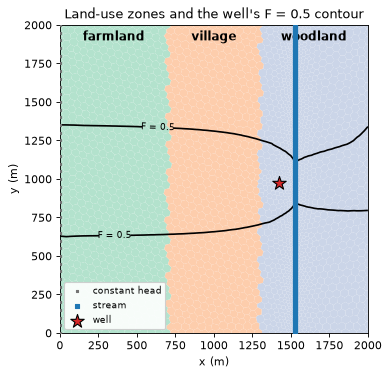
A zone array gives every cell an integer. Here the land is divided into three bands, farmland in the west, a village in the centre and woodland in the east, from the x coordinate of each cell centre. The same line of code works for any grid because it only needs the cell centres.
gs.groups_by_zone(step, zones, package="RCH") makes one group per zone value, holding the recharge terms of the cells in that zone. Traced forward (tutorial 03), each group’s volume_to_by_term[...]["WEL"] is the recharge from that zone that ends in the well. (gs.select_zone(step, zones, 2, package="RCH") gives a single zone’s group.)
land_rows = {}
for label in ("DIS", "DISV"):
    step, run = steps[label], runs[label]
    zones = np.digitize(gs.export.cell_centres(run.grb_file)[:, 0], LAND_USE_X) + 1  # 1, 2, 3
    groups = gs.groups_by_zone(step, zones, package="RCH")
    fwd = gs.forward(step, groups)
    well_cell = np.flatnonzero(results[label].selections[WELL].cells)[0]
    row = {LAND_USE[int(g.removeprefix("zone_"))]: fwd.volume_to_by_term[g]["WEL"][well_cell] for g in groups}
    row["all recharge (backward)"] = results[label].volume_from_by_term[WELL]["RCH"].sum()
    land_rows[label] = row
land = pd.DataFrame(land_rows).T
land.loc["DISV vs DIS (%)"] = 100.0 * (land.loc["DISV"] / land.loc["DIS"] - 1.0)
display(land.round(1).rename_axis("m3/d reaching the well"))
| farmland | village | woodland | all recharge (backward) | |
|---|---|---|---|---|
| m3/d reaching the well | ||||
| DIS | 227.4 | 192.5 | 146.0 | 565.9 |
| DISV | 240.1 | 192.2 | 145.9 | 578.1 |
| DISV vs DIS (%) | 5.6 | -0.2 | -0.1 | 2.2 |
The capture zone is a band of nearly constant width from the west edge to the stream (map below). Each land use therefore contributes roughly in proportion to the length of the band it covers. The farmland (700 m) contributes most, then the village (600 m). The woodland share comes from the short stretch west of the stream and from the tail across it. The rest of the 800 m³/d is regional inflow from the west edge and stream water. The forward split by zone adds up to the recharge share found by the backward trace (last column): the forward/backward duality of tutorial 03. On DISV the farmland sends 5.6 % more recharge to the well than on DIS (last row). The village and the woodland differ by less than 0.5 %. The farmland band holds the west edge, where the Voronoi constant-head cells are narrower (section 4). In total the DISV well receives 2.2 % more recharge, the same relative difference as the recharge share in section 4.
For the backward direction a zone array selects destinations in the same way: gs.select_zone(step, zones, 3, package="SFR") would be the stream reaches in the woodland band. The zone map with the well’s \(F = 0.5\) contour on the Voronoi grid:
zones_v = np.digitize(gs.export.cell_centres(run_v.grb_file)[:, 0], LAND_USE_X) + 1
ax = hbd.plot_cells(
    run_v.grb_file, step_v, zones_v.astype(float), cmap="Pastel2", vmin=0.5, vmax=8.5,
    title="Land-use zones and the well's F = 0.5 contour", colorbar=False,
)
hbd.add_contours(ax, run_v.grb_file, step_v, res_v.fraction_through[WELL], (0.5,), colors="k")
for value, name in LAND_USE.items():
    x = np.mean(np.r_[0.0, LAND_USE_X, 2000.0][value - 1 : value + 1])
    ax.text(x, 1900.0, name, ha="center", fontsize=11, fontweight="bold")
plt.show()
7. Export to GeoPackage and netCDF#
GeoPackage is the format for GIS. gs.export.to_geopackage writes one polygon per cell (from the grid file’s vertices) and one column per output and group, named <output>__<group>, plus one column per source package of the split (volume_from_by_term__<group>__<package>). DIS and DISV grids get one layer per model layer (layer_1, …). DISU gets one layer nodes. The tutorial model has local coordinates and no coordinate reference system (CRS), so the cell below silences geopandas’ warning about it. For a real model, pass its coordinate reference system with crs= (e.g. crs="EPSG:2193") so the layers land in the right place.
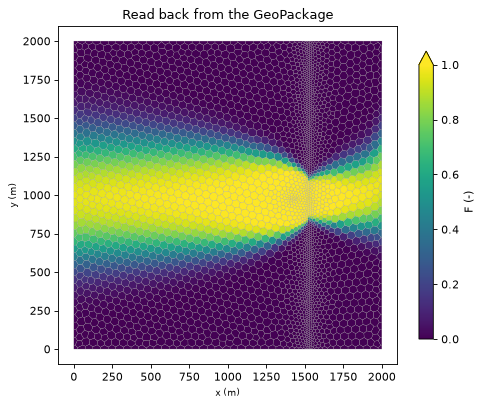
Open the file in QGIS with Layer → Add Layer → Add Vector Layer (or drag it into the map), and style a column with a graduated renderer, e.g. fraction_through__supply_well with breaks at 0.1 and 0.5. Here we read it back with geopandas:
with warnings.catch_warnings():  # the tutorial model has local coordinates and no CRS
    warnings.filterwarnings("ignore", message="'crs' was not provided")
    gpkg_path = gs.export.to_geopackage(WORK / "voronoi_outlets.gpkg", step_v, res_v)
frame = gpd.read_file(gpkg_path, layer="layer_1")
print(f"{gpkg_path.name}: {len(frame)} polygons, {frame.shape[1] - 1} columns")
columns = ["layer", "icell2d", "active", f"fraction_through__{WELL}", "fraction_through__stream_north", f"volume_from__{WELL}"]
display(frame[columns + ["geometry"]].sample(5, random_state=0).sort_index().round(4))  # five cells

ax = frame.plot(
    column=f"fraction_through__{WELL}", cmap="viridis", vmin=0.0, vmax=1.0, edgecolor="0.6",
    linewidth=0.2, legend=True, legend_kwds={"label": "F (-)", "shrink": 0.85}, figsize=(7.0, 5.5),
)
ax.set_title("Read back from the GeoPackage")
ax.set_xlabel("x (m)")
ax.set_ylabel("y (m)")
plt.show()
voronoi_outlets.gpkg: 3241 polygons, 33 columns
| layer | icell2d | active | fraction_through__supply_well | fraction_through__stream_north | volume_from__supply_well | geometry | |
|---|---|---|---|---|---|---|---|
| 380 | 1 | 381 | 1 | 0.0021 | 0.0000 | 0.0004 | POLYGON ((1574.125 769.171, 1580.307 759.376, ... |
| 638 | 1 | 639 | 1 | 0.0000 | 0.0000 | 0.0000 | POLYGON ((1540.051 287.83, 1543.073 279.987, 1... |
| 706 | 1 | 707 | 1 | 0.0000 | 1.0000 | 0.0000 | POLYGON ((1532.712 1661.84, 1540.659 1661.707,... |
| 1474 | 1 | 1475 | 1 | 0.1135 | 0.8865 | 0.1228 | POLYGON ((434.848 1540.235, 462.805 1547.459, ... |
| 3121 | 1 | 3122 | 1 | 0.0000 | 0.0000 | 0.0000 | POLYGON ((1273.662 98.84, 1280.625 71.304, 124... |
netCDF keeps the result as labelled arrays with units and a provenance record, for xarray, Panoply or further processing. The grid dimensions follow the grid type, so the same variable has different dimensions on each grid:
for label, filename in (("DIS", "dis.nc"), ("DISV", "disv.nc"), ("DISU", "disu.nc")):
    nc_path = gs.export.to_netcdf(WORK / filename, steps[label], results[label])
    with xr.open_dataset(nc_path) as ds:
        f_nc = ds["fraction_through"].sel(group=WELL)
        print(f"{label:4s} {filename:7s} fraction_through dims {dict(f_nc.sizes)}")
        assert np.allclose(f_nc.values.ravel(), results[label].fraction_through[WELL], equal_nan=True)

with xr.open_dataset(WORK / "disv.nc") as ds:
    shares_nc = ds["volume_from_by_term"].sel(group=WELL).sum("icell2d").squeeze()
    display(shares_nc.to_pandas().rename("volume from (m3/d)").round(1).to_frame())
DIS  dis.nc  fraction_through dims {'layer': 1, 'row': 40, 'col': 40}
DISV disv.nc fraction_through dims {'layer': 1, 'icell2d': 3241}
DISU disu.nc fraction_through dims {'node': 1600}
| volume from (m3/d) | |
|---|---|
| package | |
| CHD | 111.1 |
| RCH | 578.1 |
| SFR | 110.8 |
8. Sanity checks#
The claims of this tutorial, as assertions: DIS and DISU agree to machine precision, every trace closes, the outlet fractions sum to 1, and the block solver matches the plain LU on the XT3D model.
assert np.allclose(results["DISU"].fraction_through[WELL], results["DIS"].fraction_through[WELL], rtol=0.0, atol=1e-12)
for label, step in {**steps, "XT3D": step_x}.items():
    res = results.get(label, res_x)
    assert gs.diagnostics.backward_closure(step, res, WELL).relative_error < 1e-8, label
assert np.allclose(total, 1.0, atol=1e-10)
width = edges["edge width (m)"]
assert width["rotated squares"] > width["DIS"] and width["DISV, 25 m"] < width["DISV"]
assert np.ptp(edges["expected area (km2)"]) / edges.loc["DIS", "expected area (km2)"] < 0.01
assert np.allclose(lu.fraction_through[WELL], res_x.fraction_through[WELL], atol=1e-12)
assert res_x.solver_used == ["block"] and len(cycles) > 0
print("all checks passed")
print(f"notebook run time: {time.perf_counter() - START:.0f} s")
all checks passed
notebook run time: 7 s
Key points#
The method needs only the cell connections and the flows across them, which MF6 writes the same way for DIS, DISV and DISU: the code to read, select and trace is identical on every grid.
The same cells and connections give the same answer: DIS and DISU agree to machine precision. A Voronoi model of the same aquifer, refined around the well and the stream, is close but not equal. Its stream share agrees with DIS within 1 %. The largest difference is in the share from the west edge, where the two grids place the constant heads differently. Check boundary placement first when comparing grids.
The edge of a full-mixing zone depends on the grid more than its size does. Squares turned by 45° to the flow made the edge about 1.7 times wider than squares aligned with the flow. Halving the Voronoi cell size made it about a third narrower. The expected area changed by less than 0.5 % across these grids.
XT3D can make the flow go round in flow loops. The default solver then switches from topological substitution to a block-triangular sparse LU, and the answer stays exact. The loop report (
cycle_report) shows where the loops are and how much water goes round. Deleting loop connections, as the reference method does, is only available in net mode, for comparison.Boundnames and zone arrays build groups in bulk (
groups_by_boundname,groups_by_zone,select_zone) on any grid.GeoPackage export gives polygon layers for QGIS. netCDF gives labelled arrays for xarray, with dimensions that follow the grid type.
Next#
05 · Transient snapshots: how the capture zone changes through the seasons, statistics over time steps, and storage as a source.