09 · Ensembles: how sure are we about the capture zone?#
Every capture zone so far came from one model with one set of parameters. The hydraulic conductivity of a real aquifer is never known that well. A calibrated model is one of many parameter sets that fit the data about equally well. Tools such as PEST++ IES produce such sets: an ensemble of parameter realisations. The honest answer to “which cells feed the well?” is then a probability.
This tutorial traces an ensemble of conductivity fields. You will:
build 50 realisations of the quickstart aquifer, with random K at 100 pilot points kriged to every cell;
run the ensemble driver
gs.run_ensemble, which traces every realisation and keeps only running statistics;map the capture probability \(P(F > 0.1)\) and \(P(F > 0.5)\);
map the mean and quantiles of \(F\);
look at the spread of the well’s shares by source across realisations;
compare exact and histogram quantiles, and see when each fits in memory;
run realisations in parallel;
weigh parameter uncertainty against the grid and mixing effects of tutorials 01 and 06;
history-match the ensemble to head data with PEST++ IES, then trace the posterior realisations and see the capture probability narrow;
check the ensemble statistics against each other.
Runtime: about 1.5 minutes (printed at the end). Prerequisites: tutorials 01 and 06. Section 9 needs pyemu (in environment.yml) and PEST++ in bin/. scripts/setup_env.py installs PEST++. If it is missing, section 9 installs it with pyemu’s get_pestpp.
Settings#
All settings live in this first cell. The realisations are written to tutorials/_work/09_ensembles/ (git-ignored, recreated on every run). Shared builders and plots are in herebedragons.py. Code specific to this tutorial is in helpers.py next to this notebook: the pilot-point ensemble, a per-realisation summary table, a process-pool check, the face-routing comparison and the PEST++ IES set-up.
import os
import sys
import time
from pathlib import Path

import flopy
import matplotlib.pyplot as plt
import numpy as np
import pandas as pd

sys.path.insert(0, str(Path.cwd().parent))  # tutorials/ holds the shared helpers
sys.path.insert(0, str(Path.cwd()))  # this folder holds helpers.py
import helpers  # noqa: E402
import herebedragons as hbd  # noqa: E402

import gwsource as gs  # noqa: E402

NOTEBOOK_START = time.perf_counter()
WORK = hbd.work_dir("09_ensembles", clean=True)  # tutorials/_work/09_ensembles (git-ignored)
MF6 = hbd.mf6_exe()  # <repo>/bin/mf6
N_REAL = 50  # number of K realisations in the prior ensemble
PRIOR_SEED = 3  # draws the prior ensemble
SIGMA_LNK = 0.8  # standard deviation of ln K
CORRELATION_LENGTH = 400.0  # m: ln K is correlated as exp(-(r / CORRELATION_LENGTH)^2)
PP_SPACING = 4  # pilot points every 4 cells (200 m): a 10 x 10 grid
NUGGET = 1e-4  # keeps the pilot-point correlation matrix well conditioned
GROUP = "well"
GROUPS = {GROUP: {"boundnames": ["supply_well"]}}  # select() arguments, applied to every realisation
THRESHOLDS = (0.1, 0.5)  # capture probability P(F > t)
QUANTILES = (0.05, 0.5, 0.95)
POROSITY = 0.3  # for the mean travel time outputs (tutorial 06)
TIME_RANGE = (0.0, 1.5e5)  # histogram range of mean_time (days), for approximate quantiles
TRY_PARALLEL = True  # run the parallel comparison where process pools are allowed
PARALLEL_WORKERS = 2
SOURCE_LABELS = {"RCH": "recharge", "SFR": "stream leakage", "CHD": "west edge"}

# Section 9: history matching with PEST++ IES
TRUTH_SEED = 2024  # seeds the synthetic "true" K field
N_OBS = 40  # number of head observation cells
OBS_SEED = 11  # picks the observation cells
NOISE_SD = 0.05  # standard deviation of the head measurement noise (m)
NOISE_SEED = 12  # draws the noise added to the true heads
N_ITER = 3  # PEST++ IES iterations (NOPTMAX)
N_WORKERS = min(8, os.cpu_count() or 1)  # local PEST++ workers; 0 runs PEST++ serially

plt.rcParams.update({"figure.dpi": 80, "figure.figsize": (7.0, 5.5)})
print(f"gwsource {gs.__version__}, FloPy {flopy.__version__}")
gwsource 0.0.1, FloPy 3.12.0.dev0
1. Build the ensemble#
The ensemble holds N_REAL = 50 copies of the quickstart model (tutorial 01). Each copy has its own log-normal K field. Everything else (recharge, stream, west edge, well) is the same in every realisation. So is the grid.
Each K field is set by pilot points: K values at 100 points on a regular grid, 200 m apart. The model’s K field is interpolated from them by kriging, so a few values define a smooth field everywhere. PEST++ adjusts these 100 values in section 9.
The pilot-point values are \(K = 5 \exp(0.8\, z)\) around the quickstart’s 5 m/d. Here \(z\) is drawn from a multivariate normal distribution with mean 0 and standard deviation 1. The correlation between two points a distance \(r\) apart is \(\exp(-(r/L)^2)\), with \(L\) = 400 m.
The field between the pilot points is simple kriging of \(\ln K\) around \(\ln 5\) with the same correlation. The kriging weights are computed once.
helpers.build_kriged_model writes the quickstart model with K read from the file k.txt. helpers.run_parameter_ensemble copies it once per realisation into real_000, real_001, …, writes the kriged K field to k.txt and runs MF6.
These realisations are a prior: no data has shaped them. Section 9 conditions them on head data with PEST++ IES and traces the result with the same code. We also build the homogeneous quickstart model as a base case.
start = time.perf_counter()
base = hbd.build_quickstart(WORK / "base", MF6)
spec = base.spec  # the homogeneous quickstart aquifer: grid, stresses and mean K
base_step = gs.read_step(base.ws, boundnames=True)
base_res = gs.backward(base_step, {GROUP: gs.select(base_step, **GROUPS[GROUP])})
F_base = base_res.fraction_through[GROUP]

mean_k = float(spec.k)
pp_cells = helpers.pilot_point_cells(spec, PP_SPACING)
pp_cov = helpers.pilot_point_covariance(spec, pp_cells, CORRELATION_LENGTH, NUGGET)
weights = helpers.kriging_weights(spec, pp_cells, CORRELATION_LENGTH, NUGGET)  # (nrow, ncol, pilot points)
prior_values = helpers.draw_prior(pp_cov, mean_k, SIGMA_LNK, N_REAL, PRIOR_SEED)  # (realisations, pilot points)
model = helpers.build_kriged_model(WORK / "model", MF6, spec, weights, mean_k)
folders = helpers.run_parameter_ensemble(model, WORK / "prior", helpers.prior_frame(prior_values), MF6, mean_k)
print(f"built and ran {len(folders)} realisations in {time.perf_counter() - start:.1f} s")
prior_lnk = np.log(mean_k) + np.einsum("rcp,np->nrc", weights, np.log(prior_values) - np.log(mean_k))
print(f"{len(pp_cells)} pilot points; ln K of the prior fields: mean {prior_lnk.mean():.2f} "
      f"(ln 5 = {np.log(mean_k):.2f}), standard deviation {prior_lnk.std():.2f} (target {SIGMA_LNK})")

pp_xy = np.array([spec.xy(rc) for rc in pp_cells])
fig, axes = plt.subplots(1, 4, figsize=(16.0, 4.0))
for ax, ws in zip(axes, folders):
    log10_k = np.log10(np.loadtxt(ws / "k.txt")).ravel()
    collection = gs.export.plot_map(base.grb_file, base_step, log10_k, ax=ax, cmap="RdYlBu_r",
                                    vmin=-0.3, vmax=1.7)
    ax.scatter(*pp_xy.T, marker="+", s=20, color="k", linewidths=0.8)
    hbd.overlay_features(ax, base.grb_file, base_step, packages=("SFR", "WEL"), legend=False)
    ax.set(aspect="equal", title=ws.name, xticks=[], yticks=[])
fig.colorbar(collection, ax=axes, shrink=0.9, label="log10 K (m/d)")
plt.show()
built and ran 50 realisations in 2.6 s
100 pilot points; ln K of the prior fields: mean 1.60 (ln 5 = 1.61), standard deviation 0.79 (target 0.8)
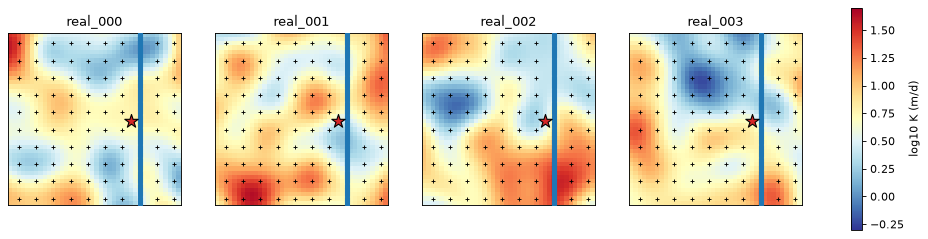
The crosses are the pilot points. The fields vary by about an order of magnitude over a few hundred metres. Lower-K patches slow the flow and steepen the gradient, so each realisation draws a different capture zone.
2. Run the ensemble driver#
gs.run_ensemble(workspaces, groups, config) does, for each realisation folder:
read the time step
config.kstpkper;re-select the groups from the
select()arguments (or call a functionstep -> groups), so a group follows its boundary even if node numbers differ;run the backward (or forward) trace, and the travel time when
porosityis set;fold the requested per-cell outputs into running statistics: min, max, mean, exceedance probabilities \(P(\text{value} > t)\) and quantiles.
Only one realisation’s outputs are in memory at a time (plus the quantile store, section 6). Every realisation must have the same grid: the connectivity arrays are hashed and compared with the first realisation’s.
The well is selected by its boundname. Boundnames are not in the budget file, so boundnames=True makes the driver load them from each realisation’s package input (FloPy). Without it, select by package, bound number or cell.
workspaces = gs.list_realisations(WORK / "prior", "real_*")
config = gs.EnsembleConfig(
    outputs=("fraction_through", "mean_time"),
    thresholds=THRESHOLDS,
    quantiles=QUANTILES,
    porosity=POROSITY,
    histogram_range={"mean_time": TIME_RANGE},
    boundnames=True,  # GROUPS selects the well by boundname
)
start = time.perf_counter()
ens = gs.run_ensemble(workspaces, GROUPS, config)
serial_time = time.perf_counter() - start
print(f"{len(ens.realisations)} realisations traced in {serial_time:.2f} s; "
      f"outputs {ens.outputs}; quantiles: {ens.quantile_method}")
print(f"well inflow per realisation: {ens.group_inflow[GROUP].min():.1f} to {ens.group_inflow[GROUP].max():.1f} m3/d")
transit = ens.mean_transit_time[GROUP] / 365.25
print(f"mean travel time to the well (sum V F / Q): min to max {transit.min():.0f} to {transit.max():.0f} yr, "
      f"median {np.median(transit):.0f} yr")
50 realisations traced in 1.00 s; outputs ['fraction_through', 'mean_time']; quantiles: exact
well inflow per realisation: 800.0 to 800.0 m3/d
mean travel time to the well (sum V F / Q): min to max 28 to 57 yr, median 46 yr
Tracing 50 realisations of 1600 cells takes a fraction of a second. Building and running the MF6 models took most of the time. The well rate is the same in every realisation, so the inflow is 800 m³/d throughout. The mean travel time (tutorial 06’s \(\sum V F / Q\)) differs between realisations. The range printed above is the minimum to the maximum over the 50 realisations. Section 8 quotes the 5 to 95 % range instead.
3. Capture probability#
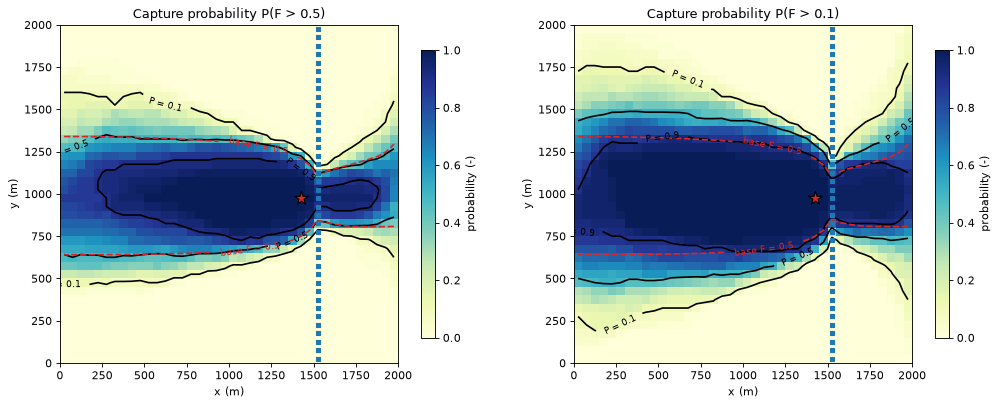
ens.exceedance[t]["fraction_through"][group] is, for every cell, the share of realisations in which \(F > t\):
\(P(F > 0.5)\): the probability that the cell lies inside the advective capture zone (tutorial 01: \(F = 0.5\) is the best estimate of that zone’s edge);
\(P(F > 0.1)\): the probability that the cell lies inside the conservative outline.
The dashed line is the base case’s \(F = 0.5\) contour.
fig, axes = plt.subplots(1, 2, figsize=(13.0, 5.0))
for ax, t in zip(axes, (0.5, 0.1)):
    prob = ens.exceedance[t]["fraction_through"][GROUP]
    hbd.plot_cells(
        base.grb_file, base_step, prob, ax=ax, cmap="YlGnBu", vmin=0.0, vmax=1.0,
        title=f"Capture probability P(F > {t})", label="probability (-)", overlay=False,
    )
    hbd.add_contours(ax, base.grb_file, base_step, prob, (0.1, 0.5, 0.9), colors="k", fmt="P = %.1f")
    hbd.add_contours(ax, base.grb_file, base_step, F_base, (0.5,), colors="tab:red",
                     linestyles=["--"], fmt="base F = %.1f")
    hbd.overlay_features(ax, base.grb_file, base_step, packages=("SFR", "WEL"), legend=False)
fig.tight_layout()
plt.show()

area = base_step.area
rows = {}
for t in THRESHOLDS:
    prob = ens.exceedance[t]["fraction_through"][GROUP]
    rows[f"P(F > {t})"] = {f"area P >= {p} (km2)": area[prob >= p].sum() / 1e6 for p in (0.9, 0.5, 0.1)}
    rows[f"P(F > {t})"]["area P > 0 (km2)"] = area[prob > 0].sum() / 1e6
display(pd.DataFrame(rows).T.round(3))
print(f"base case: area F > 0.5 = {area[F_base > 0.5].sum() / 1e6:.3f} km2, "
      f"F > 0.1 = {area[F_base > 0.1].sum() / 1e6:.3f} km2")
| area P >= 0.9 (km2) | area P >= 0.5 (km2) | area P >= 0.1 (km2) | area P > 0 (km2) | |
|---|---|---|---|---|
| P(F > 0.1) | 1.045 | 1.635 | 2.295 | 2.70 |
| P(F > 0.5) | 0.560 | 1.142 | 1.702 | 2.02 |
base case: area F > 0.5 = 1.147 km2, F > 0.1 = 1.540 km2
How to read the maps:
The dark core (\(P \ge 0.9\)) is captured in nearly every realisation: the cells around the well and along the main flow path from the west. Protection there does not depend on knowing K better.
The gradient between \(P = 0.9\) and \(P = 0.1\) is where the capture zone’s position depends on the K field: the zone swings north or south as low-K patches deflect the flow.
The outer limit (\(P > 0\)) is the union of all realisations’ zones: an upper bound that grows with the ensemble size, not a probability statement.
A protection zone can then be drawn with an explicit risk level, for example “every cell with at least a 10 % chance of being inside the advective capture zone”, \(P(F > 0.5) \ge 0.1\). The two thresholds combine two different uncertainties: \(P(F > 0.1)\) adds the conservative margin for numerical mixing (tutorial 01) on top of the parameter uncertainty.
4. Mean and quantile maps#
ens.stats["mean"] and ens.quantiles[q] give the per-cell mean and quantiles over the realisations.
panels = {
    "mean F": ens.stats["mean"]["fraction_through"][GROUP],
    "5 % quantile of F": ens.quantiles[0.05]["fraction_through"][GROUP],
    "median F": ens.quantiles[0.5]["fraction_through"][GROUP],
    "95 % quantile of F": ens.quantiles[0.95]["fraction_through"][GROUP],
}
fig, axes = plt.subplots(1, 4, figsize=(16.0, 4.0))
for ax, (title, values) in zip(axes, panels.items()):
    collection = gs.export.plot_map(base.grb_file, base_step, values, ax=ax, cmap="viridis",
                                    vmin=0.0, vmax=1.0)
    hbd.overlay_features(ax, base.grb_file, base_step, packages=("SFR", "WEL"), legend=False)
    ax.set(aspect="equal", title=title, xticks=[], yticks=[])
fig.colorbar(collection, ax=axes, shrink=0.9, label="F (-)")
plt.show()
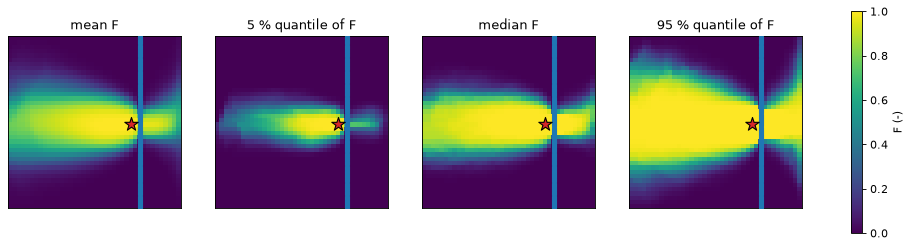
The mean of \(F\) looks like a smoothed capture zone: it is the expected fraction of each cell’s water that reaches the well, averaging the parameter uncertainty and the numerical mixing together. The quantile maps are per cell: the 5 % map is not the capture zone of a “small” realisation, but the value each cell exceeds in 95 % of the realisations. Where the 5 % quantile is high, the cell is captured whatever the K field. Where the 95 % quantile is still low, it is almost never captured.
5. The well’s water by source, across realisations#
The split of the pumped water by source package is a sum over cells, not a per-cell output, so helpers.summarise_realisations traces each realisation once more and tabulates the shares (the same table as hbd.volume_from_table in tutorial 01) and the capture areas.
table = helpers.summarise_realisations(workspaces, GROUP, GROUPS[GROUP], THRESHOLDS)
table["mean travel time (yr)"] = ens.mean_transit_time[GROUP] / 365.25
share_cols = [c for c in table.columns if c.startswith("share ")]
display(table.describe().loc[["mean", "std", "min", "50%", "max"]].round(3))

shares = table[share_cols].rename(columns=lambda c: SOURCE_LABELS.get(c[6:], c[6:]))
base_shares = hbd.volume_from_table(base_res, GROUP)["share"].rename(SOURCE_LABELS)
print("base case (homogeneous K): " + ", ".join(f"{name} {share:.1%}" for name, share in base_shares.items()))
print("realisations, min to max:  " + ", ".join(
    f"{name} {shares[name].min():.1%} to {shares[name].max():.1%}" for name in shares.columns))
print(f"recharge gives more than half of the water in {(shares['recharge'] > 0.5).sum()} of {len(shares)} "
      f"realisations; the stream gives less than 1 % in {(shares['stream leakage'] < 0.01).sum()}")
fig, ax = plt.subplots(figsize=(7.5, 4.0))
ax.boxplot([shares[c] for c in shares.columns], positions=range(len(shares.columns)), widths=0.5,
           showfliers=False)
rng = np.random.default_rng(0)
for i, column in enumerate(shares.columns):
    ax.scatter(i + rng.uniform(-0.12, 0.12, len(shares)), shares[column], s=18, alpha=0.7,
               color="tab:blue", label="realisation" if i == 0 else None, zorder=3)
    ax.scatter(i, base_shares.get(column, np.nan), marker="D", s=50, color="tab:red",
               label="base case (homogeneous K)" if i == 0 else None, zorder=4)
ax.set_xticks(range(len(shares.columns)), shares.columns)
ax.set_ylabel("share of the pumped water (-)")
ax.set_title(f"Where the well water comes from, over {len(shares)} realisations")
ax.legend(loc="upper right")
plt.show()
| share RCH | share CHD | share SFR | area F>0.1 (km2) | area F>0.5 (km2) | mean travel time (yr) | |
|---|---|---|---|---|---|---|
| mean | 0.696 | 0.159 | 0.145 | 1.621 | 1.128 | 44.695 |
| std | 0.093 | 0.138 | 0.106 | 0.174 | 0.155 | 5.837 |
| min | 0.431 | 0.000 | 0.000 | 1.305 | 0.638 | 28.383 |
| 50% | 0.719 | 0.130 | 0.130 | 1.645 | 1.160 | 46.211 |
| max | 0.885 | 0.569 | 0.391 | 2.055 | 1.435 | 56.850 |
base case (homogeneous K): recharge 70.7%, west edge 15.3%, stream leakage 14.0%
realisations, min to max:  recharge 43.1% to 88.5%, west edge 0.0% to 56.9%, stream leakage 0.0% to 39.1%
recharge gives more than half of the water in 48 of 50 realisations; the stream gives less than 1 % in 5
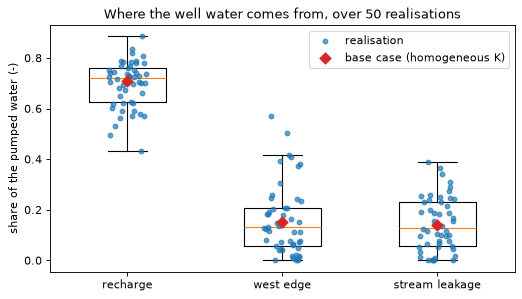
Recharge supplies more than half of the water in 48 of the 50 realisations. Its share ranges from 43 to 89 % (minimum to maximum, printed above). The stream share ranges from 0 to 39 % of the pumping. In 5 realisations the stream supplies less than 1 %. The stream share depends on whether low-K patches sit between the well and the stream. The west-edge share varies even more, from 0 to 57 %. A bank-filtration or water-quality assessment would ask for this number. One model run would give a single value somewhere in this range. The homogeneous base case gives 71 % recharge, 15 % from the west edge and 14 % stream water. Each of these lies inside the spread of the realisations. The base case alone gives no hint of how wide that spread is.
6. Exact and histogram quantiles#
Min, max, mean and exceedance are running sums, so their memory does not grow with the number of realisations. Quantiles need more:
Exact: keep every realisation’s values in a float32 stack, (realisations × cells × series) × 4 bytes, where a series is one output of one group. The driver does this when the stack fits
config.memory_budget(2 GB by default).Histogram: otherwise, keep a fixed-bin histogram per cell: bins × cells × series × 4 bytes, independent of the number of realisations. A quantile is then accurate to one bin width, (high − low) / bins, over
config.histogram_range(default (0, 1), right for fractions. Set it for times and volumes, as above.).
Forcing the histogram path with memory_budget=0 and comparing:
approx = gs.run_ensemble(workspaces, GROUPS, gs.EnsembleConfig(**{**vars(config), "memory_budget": 0}))
print("quantile method:", approx.quantile_method)
rows = {}
for output in config.outputs:
    low, high = config.bin_range(output)
    defined = ens.stats["count"][output][GROUP] > 0
    beyond = defined & (ens.stats["max"][output][GROUP] > high + 1e-9 * (high - low))  # beyond round-off
    diff = helpers.max_quantile_difference(ens, approx, output, GROUP)
    rows[output] = {
        "range": f"{low:g} to {high:g}",
        "bin width": f"{approx.bin_width[output]:.3g}",
        **{f"max |diff| q={q} (in range)": f"{d:.3g}" for q, d in diff.items()},
        "cells with values above the range": int(beyond.sum()),
    }
display(pd.DataFrame(rows).T)
largest = np.nanmax(ens.stats["max"]["mean_time"][GROUP])
print(f"largest mean_time in any cell and realisation: {largest:.3g} d ({largest / 365.25:.0f} yr)")
quantile method: histogram
| range | bin width | max |diff| q=0.05 (in range) | max |diff| q=0.5 (in range) | max |diff| q=0.95 (in range) | cells with values above the range | |
|---|---|---|---|---|---|---|
| fraction_through | 0 to 1 | 0.005 | 0.0048 | 0.00463 | 0.00469 | 0 |
| mean_time | 0 to 150000 | 750 | 439 | 485 | 547 | 110 |
largest mean_time in any cell and realisation: 9.99e+05 d (2736 yr)
Where a cell’s values lie inside the histogram range, every histogram quantile is within one bin width of the exact one. The means, minima, maxima and probabilities do not depend on the quantile method at all. Two lessons:
The bin width is the price of the range. For fractions, (0, 1) in 200 bins gives 0.005. For
mean_time, (0, 150,000 d) gives bins of 750 days.Outside the range there is no bound. Values beyond it are counted in the end bins, so a quantile there is only clamped to the cell’s minimum and maximum. The conditional mean time of cells on the far edge of the capture zone, where only a tiny fraction of the water reaches the well, reaches about 2,700 years, far beyond any useful range. Set
histogram_rangeto cover the values you care about, and mask such cells (by \(F\) or by the capture probability) before using their times.
The memory budget decides between the two. For a regional model of a million cells and, say, three outputs of two groups (six series):
cells, series, bins = 1_000_000, 6, config.histogram_bins
rows = {
    n_real: {
        "exact stack (GB)": gs.ensemble.stack_bytes(n_real, cells, series) / 1e9,
        "histograms (GB)": 4 * bins * cells * series / 1e9,
    }
    for n_real in (50, 100, 300, 1000)
}
display(pd.DataFrame(rows).T.rename_axis("realisations").round(2))
n_series = len(config.outputs) * len(GROUPS)
print(f"this tutorial: exact stack {gs.ensemble.stack_bytes(N_REAL, base_step.n_cells, n_series) / 1e6:.2f} MB")
| exact stack (GB) | histograms (GB) | |
|---|---|---|
| realisations | ||
| 50 | 1.2 | 4.8 |
| 100 | 2.4 | 4.8 |
| 300 | 7.2 | 4.8 |
| 1000 | 24.0 | 4.8 |
this tutorial: exact stack 0.64 MB
The exact stack grows with the number of realisations. The histograms do not, so they win only once there are more realisations than bins (200 by default). Below that, raise memory_budget if the machine allows it and keep exact quantiles. Above it, or for outputs you only need roughly, the histograms cap the memory. Fewer series help either way: ask only for the outputs you will use, and aggregate groups (groups_by_package, groups_by_zone) rather than tracing every well separately.
7. Serial and parallel runs#
With max_workers > 1 the driver traces realisations in a ProcessPoolExecutor and folds the results back in realisation order, so the statistics are bit-identical to a serial run. Two practical points:
Process pools need OS support. They use semaphores and, on macOS and Windows, freshly spawned Python processes. Some sandboxes and restricted job environments forbid this. The check below then skips the parallel run.
max_workers=1(the default) always works.Spawned workers re-import the package and cannot see functions defined in a notebook. Pass groups as a dict of
select()arguments (as here) or as a function from an importable module.
if TRY_PARALLEL and helpers.process_pool_available():
    start = time.perf_counter()
    par = gs.run_ensemble(workspaces, GROUPS, gs.EnsembleConfig(**{**vars(config), "max_workers": PARALLEL_WORKERS}))
    parallel_time = time.perf_counter() - start
    for output in config.outputs:
        for name in ("mean", "min", "max"):
            np.testing.assert_array_equal(par.stats[name][output][GROUP], ens.stats[name][output][GROUP])
        for q in QUANTILES:
            np.testing.assert_array_equal(par.quantiles[q][output][GROUP], ens.quantiles[q][output][GROUP])
    print(f"serial {serial_time:.2f} s, {PARALLEL_WORKERS} workers {parallel_time:.2f} s; statistics bit-identical")
else:
    print("process pools are not available here (or TRY_PARALLEL is False): parallel run skipped")
serial 1.00 s, 2 workers 1.29 s; statistics bit-identical
On a model this small the workers spend more time starting up than tracing, so the parallel run is not faster. Parallel runs pay off when one realisation takes seconds to read and trace, as for regional models of a few hundred thousand cells.
8. Parameter uncertainty or grid and mixing effects: which matters more here?#
Tutorials 01 and 06 showed that full mixing smears the capture-zone edge over a band of cells. The table below puts that effect next to the spread caused by K. It has three columns:
parameter spread: the 5 to 95 % range over the 50 realisations, computed here;
full mixing → face routing: the base case traced twice, once with full mixing and once with face-to-face routing (Chowdhury 2016;
gwsource.experimental.face_routing). Face routing passes the water that enters a cell through one face to the outflow faces it reaches in the cell’s velocity field, instead of mixing it over all of them. The difference shows how much the full-mixing assumption alone changes each answer. It is computed here.cell size and particles: results from other tutorials, cited and not recomputed: the grid-refinement tests of tutorial 11 and the particle comparison of tutorial 06.
p05 = ens.exceedance[0.5]["fraction_through"][GROUP]
area_f05 = table["area F>0.5 (km2)"]
routed = helpers.face_routing_trace(base_step, base.grb_file, {GROUP: gs.select(base_step, **GROUPS[GROUP])})
mixing = helpers.capture_summary(base_step, base_res, GROUP)
routing = helpers.capture_summary(base_step, routed, GROUP)


def spread(values: pd.Series, fmt: str) -> str:
    """Return the 5 to 95 % range of a column as text."""
    return f"{values.quantile(0.05):{fmt}} to {values.quantile(0.95):{fmt}}"


def change(key: str, fmt: str) -> str:
    """Return the base-case value under full mixing and under face routing as text."""
    return f"{mixing[key]:{fmt}} → {routing[key]:{fmt}}"


rows = {
    "capture area F > 0.5 (km2)": {
        "parameter spread (5-95 %)": spread(area_f05, ".2f"),
        "full mixing → face routing": change("area F > 0.5 (km2)", ".2f"),
        "cell size and particles (elsewhere)": "within 5 % of the reference zone at 50 m cells (tutorial 11)",
    },
    "uncertain edge band (km2)": {
        "parameter spread (5-95 %)": f"{area[(p05 > 0.1) & (p05 < 0.9)].sum() / 1e6:.2f} (0.1 < P(F > 0.5) < 0.9)",
        "full mixing → face routing": change("band 0.1 < F < 0.9 (km2)", ".2f") + " (0.1 < F < 0.9)",
        "cell size and particles (elsewhere)": "narrows slowly as cells get smaller (tutorial 11)",
    },
    "stream share of the well water": {
        "parameter spread (5-95 %)": spread(table["share SFR"], ".3f"),
        "full mixing → face routing": change("stream share", ".3f"),
        "cell size and particles (elsewhere)": "same to three digits as particles on the same grid (tutorial 11)",
    },
    "mean travel time (yr)": {
        "parameter spread (5-95 %)": spread(table["mean travel time (yr)"], ".0f"),
        "full mixing → face routing": "not computed (face routing gives no travel times)",
        "cell size and particles (elsewhere)": "0.5 % from particles for the base case (tutorial 06)",
    },
}
with pd.option_context("display.max_colwidth", None):
    display(pd.DataFrame(rows).T)
| parameter spread (5-95 %) | full mixing → face routing | cell size and particles (elsewhere) | |
|---|---|---|---|
| capture area F > 0.5 (km2) | 0.90 to 1.33 | 1.15 → 1.16 | within 5 % of the reference zone at 50 m cells (tutorial 11) |
| uncertain edge band (km2) | 1.08 (0.1 < P(F > 0.5) < 0.9) | 0.73 → 0.56 (0.1 < F < 0.9) | narrows slowly as cells get smaller (tutorial 11) |
| stream share of the well water | 0.000 to 0.326 | 0.140 → 0.140 | same to three digits as particles on the same grid (tutorial 11) |
| mean travel time (yr) | 35 to 52 | not computed (face routing gives no travel times) | 0.5 % from particles for the base case (tutorial 06) |
For this prior ensemble (\(\sigma_{\ln K} = 0.8\)), the parameter spread is much larger than the effect of the mixing assumption on the integral answers:
The capture area varies from 0.90 to 1.33 km² across the realisations. Face routing changes the base-case area by less than 0.01 km².
The stream share varies from 0.000 to 0.326. Face routing leaves it unchanged to three digits.
The mean travel time varies from 35 to 52 years. Particles changed it by 0.5 % in tutorial 06.
The parameter spread also blurs the zone edge more than full mixing does. The band where the realisations disagree (0.1 < P(F > 0.5) < 0.9) covers 1.08 km². The band that full mixing smears in the base case (0.1 < F < 0.9) covers 0.73 km². Face routing narrows it to 0.56 km². A finer grid or face routing sharpens the edge of each realisation’s zone. Neither tells you which realisation is right.
Two caveats apply. First, this K ensemble is a prior made up for the tutorial. Section 9 conditions it on head data. Its band of disagreement shrinks. Second, other parameters such as recharge, streambed conductance and porosity add their own spread. An ensemble over all of them is the next step.
9. History matching with PEST++ IES#
The 50 realisations above are a prior. Every field is equally likely, whatever heads were measured in the aquifer. History matching conditions an ensemble on measurements. PEST++ IES, the iterative ensemble smoother of PEST++ (White 2018), does this. It adjusts every realisation of a parameter ensemble until the model fits the observations to within their noise. Here it adjusts the 100 pilot-point values of each realisation. The adjusted ensemble is the posterior. Tracing its realisations gives a capture probability that is conditioned on the data.
This section runs a small synthetic example from start to end:
take one random K field as the “truth” and sample its heads in 40 cells, with noise (9.1);
write the forward run and the PEST control file with pyemu (9.2);
run PEST++ IES on the prior of section 1 for three iterations, with local parallel workers (9.3);
rerun and trace the posterior realisations, and compare their capture probability with the prior’s (9.4).
PEST++ is a separate program. scripts/setup_env.py installs it into bin/ with pyemu’s get-pestpp command. If bin/pestpp-ies is missing, helpers.pestpp_exe below installs it the same way: it calls pyemu.utils.get_pestpp.run_main, which downloads the latest PEST++ release from GitHub into a folder under the system temporary directory and unpacks the programs into bin/.
9.1 A synthetic truth and its head data#
The “true” aquifer has the statistics of the prior. Its \(\ln K\) has a mean of \(\ln 5\) and a standard deviation of 0.8. It is not built from pilot points. It is Gaussian noise smoothed over a few cells (hbd.build_realisation). Gaussian smoothing of white noise with a filter of width \(s\) gives the correlation \(\exp(-(r/2s)^2)\) between two cells a distance \(r\) apart. With \(s\) = 4 cells = 200 m, this is the prior’s correlation with \(L\) = 400 m. Between the pilot points, the kriged fields of the prior can be smoother than the truth. So no realisation can reproduce the truth exactly. In a real study, too, no parameterisation reproduces the aquifer exactly.
We measure the truth’s steady-state heads in 40 random cells away from the constant heads, the stream and the well. Each measurement gets Gaussian noise with a standard deviation of 5 cm. In a real study these would be the observed heads.
start = time.perf_counter()
PESTPP = helpers.pestpp_exe(hbd.repo_root() / "bin")  # installs PEST++ with get_pestpp if missing
PEST = WORK / "pest"
smoothing_cells = CORRELATION_LENGTH / (2 * spec.delr)  # Gaussian smoothing of width s: correlation length 2 s
truth = hbd.build_realisation(PEST / "truth", MF6, TRUTH_SEED, sigma_lnk=SIGMA_LNK,
                              correlation_cells=smoothing_cells)
truth_step = gs.read_step(truth.ws, boundnames=True)
truth_res = gs.backward(truth_step, {GROUP: gs.select(truth_step, **GROUPS[GROUP])})
F_truth = truth_res.fraction_through[GROUP]
truth_summary = helpers.capture_summary(truth_step, truth_res, GROUP)

obs_cells = helpers.observation_cells(spec, N_OBS, OBS_SEED)
observed = helpers.observed_heads(truth.head_file, [spec.node(rc) for rc in obs_cells], NOISE_SD, NOISE_SEED)
print(f"PEST++ IES: {PESTPP.name} in bin/")
print(f"{N_OBS} head observations from {observed.min():.2f} to {observed.max():.2f} m, noise sd {NOISE_SD} m")
print(f"truth: area F > 0.5 = {truth_summary['area F > 0.5 (km2)']:.3f} km2, "
      f"stream share = {truth_summary['stream share']:.3f}")

obs_xy = np.array([spec.xy(rc) for rc in obs_cells])
fields = {"truth": np.log10(truth.info["k"])}
fields.update({f"prior {ws.name}": np.log10(np.loadtxt(ws / "k.txt")) for ws in folders[:3]})
fig, axes = plt.subplots(1, 4, figsize=(16.0, 4.0))
for ax, (title, log10_k) in zip(axes, fields.items()):
    collection = gs.export.plot_map(base.grb_file, base_step, log10_k.ravel(), ax=ax, cmap="RdYlBu_r",
                                    vmin=-0.3, vmax=1.7)
    if title == "truth":
        ax.scatter(*obs_xy.T, marker="o", s=30, facecolor="w", edgecolor="k", label="head observation")
        hbd.add_contours(ax, base.grb_file, base_step, F_truth, (0.5,), colors="tab:red",
                         linestyles=["--"], fmt="F = %.1f")
        ax.legend(loc="lower left", fontsize=8)
    else:
        ax.scatter(*pp_xy.T, marker="+", s=20, color="k", linewidths=0.8)
    hbd.overlay_features(ax, base.grb_file, base_step, packages=("SFR", "WEL"), legend=False)
    ax.set(aspect="equal", title=title, xticks=[], yticks=[])
fig.colorbar(collection, ax=axes, shrink=0.9, label="log10 K (m/d)")
plt.show()
PEST++ IES: pestpp-ies in bin/
40 head observations from 6.18 to 10.05 m, noise sd 0.05 m
truth: area F > 0.5 = 0.998 km2, stream share = 0.092
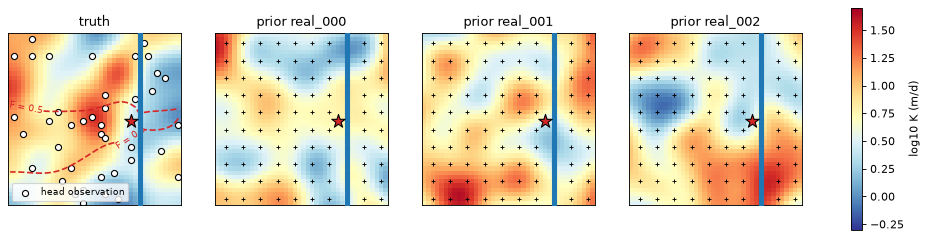
The left map is the truth, with the 40 observation cells and its \(F = 0.5\) capture-zone contour. The other three are the first prior realisations of section 1, with the pilot points marked as crosses.
9.2 The forward run and the PEST control file#
PEST++ runs the model through a forward run: a command that reads the parameter values, runs the model and writes the simulated observations. The forward run starts from the kriged model of section 1. PEST++ writes the parameter values through a template file (pilot_points.dat.tpl) and reads the outputs through an instruction file (heads.csv.ins). Here the forward run is python forward_run.py, a short script with three steps:
read the pilot-point K values from
pilot_points.datand write the kriged K field tok.txt(the model’s NPF package reads K from that file);run MF6;
write the heads at the observation cells to
heads.csv.
The script is made from three self-contained functions in helpers.py (write_k_array, run_mf6, write_head_observations). It imports only NumPy, so a run takes a fraction of a second. pyemu’s Pst.from_io_files then builds the control file from the template and instruction files. The parameters are log-transformed, with bounds four prior standard deviations either side of the mean. Each observation gets the weight \(1/\sigma\), with \(\sigma\) = 0.05 m. IES also adds noise of that size to the observations of each realisation.
template = helpers.build_pest_template(PEST / "template", MF6, spec, pp_cells, weights, obs_cells, mean_k)
helpers.write_prior(template, prior_values)  # prior.csv: the prior of section 1, one row per realisation
k_bounds = (mean_k * np.exp(-4 * SIGMA_LNK), mean_k * np.exp(4 * SIGMA_LNK))
pestpp_options = {
    "ies_parameter_ensemble": "prior.csv",
    "ies_num_reals": N_REAL,
    "ies_include_base": False,  # every realisation is a prior draw; no extra run at the mean
}
pst = helpers.build_pst(template, observed, NOISE_SD, mean_k, k_bounds, pestpp_options, noptmax=N_ITER)
print(f"{pst.npar_adj} adjustable parameters, {pst.nnz_obs} weighted observations, NOPTMAX = {N_ITER}")
print("forward_run.py main block:")
print((template / "forward_run.py").read_text(encoding="utf-8").split('if __name__ == "__main__":')[1])
noptmax:3, npar_adj:100, nnz_obs:40
100 adjustable parameters, 40 weighted observations, NOPTMAX = 3
forward_run.py main block:

    write_k_array(".", mean_k=5.0)
    run_mf6(".", "./mf6")
    write_head_observations(".", "quickstart.hds")
9.3 Run PEST++ IES#
pyemu.os_utils.start_workers copies the template folder once per worker and starts one PEST++ IES master and N_WORKERS workers. The workers run the forward runs in parallel and report to the master over local network ports. Setting N_WORKERS = 0 in the settings cell runs PEST++ serially in one folder instead, which is slower but needs no ports.
The fit is measured by phi, the weighted sum of squared residuals of each realisation. With weights of \(1/\sigma\), a realisation that fits the heads to within the noise has a phi close to the number of observations (40).
start = time.perf_counter()
master = helpers.run_ies(template, PESTPP, "case.pst", N_WORKERS, PEST / "master")
ies_time = time.perf_counter() - start
phi = helpers.read_phi(master)
display(phi.round(1))
print(f"PEST++ IES: {N_ITER} iterations, {int(phi['total_runs'].iloc[-1])} model runs, "
      f"{N_WORKERS} workers, {ies_time:.0f} s")
print(f"mean phi: {phi['mean'].iloc[0]:.0f} (prior) to {phi['mean'].iloc[-1]:.0f} (iteration {phi.index[-1]})")
# iteration 0 is the prior of section 1 (PEST++ writes six significant digits)
np.testing.assert_allclose(helpers.read_par_ensemble(master, 0).to_numpy(), prior_values, rtol=1e-5)
| total_runs | mean | standard_deviation | min | max | |
|---|---|---|---|---|---|
| iteration | |||||
| 0 | 50 | 3673.5 | 2439.5 | 552.2 | 12562.8 |
| 1 | 140 | 224.2 | 103.7 | 100.8 | 603.5 |
| 2 | 230 | 67.5 | 13.7 | 44.6 | 116.0 |
| 3 | 320 | 55.8 | 9.9 | 35.0 | 82.0 |
PEST++ IES: 3 iterations, 320 model runs, 8 workers, 61 s
mean phi: 3673 (prior) to 56 (iteration 3)
The mean phi falls from about 3,700 for the prior to about 56 after three iterations. Noise alone would give about 40. So the posterior realisations fit the heads nearly to within the measurement noise. The largest phi of the posterior (82) is below the smallest phi of the prior (552). Each iteration runs the whole ensemble once. It also runs a few test runs on a subset of realisations, to choose the size of the parameter update. That is why there are 90 runs per iteration for 50 realisations.
9.4 Trace the posterior#
The prior is already traced: it is the ensemble of sections 1 to 8. PEST++ IES wrote it back as case.0.par.csv. The check above confirms that this file holds the same values. PEST++ reuses its worker folders and keeps no model output per realisation. So we rerun each posterior realisation once more, in a folder of its own, from case.3.par.csv, the parameter file that IES wrote after iteration 3. helpers.run_parameter_ensemble does this as in section 1. gs.run_ensemble then traces the posterior with the settings of section 2.
start = time.perf_counter()
posterior_values = helpers.read_par_ensemble(master, helpers.last_iteration(master))
posterior_folders = helpers.run_parameter_ensemble(template, PEST / "posterior", posterior_values, MF6, mean_k)
posterior = gs.run_ensemble(posterior_folders, GROUPS, config)
posterior_table = helpers.summarise_realisations(posterior_folders, GROUP, GROUPS[GROUP], THRESHOLDS)
print(f"reran and traced {len(posterior_table)} posterior realisations in {time.perf_counter() - start:.1f} s")
hm = {"prior": {"ens": ens, "table": table}, "posterior": {"ens": posterior, "table": posterior_table}}

fig, axes = plt.subplots(1, 2, figsize=(13.0, 5.0))
for ax, (label, item) in zip(axes, hm.items()):
    prob = item["ens"].exceedance[0.5]["fraction_through"][GROUP]
    hbd.plot_cells(
        base.grb_file, base_step, prob, ax=ax, cmap="YlGnBu", vmin=0.0, vmax=1.0,
        title=f"{label}: P(F > 0.5), {len(item['table'])} realisations", label="probability (-)",
        overlay=False,
    )
    hbd.add_contours(ax, base.grb_file, base_step, prob, (0.1, 0.5, 0.9), colors="k", fmt="P = %.1f")
    hbd.add_contours(ax, base.grb_file, base_step, F_truth, (0.5,), colors="tab:red",
                     linestyles=["--"], fmt="truth F = %.1f")
    ax.scatter(*obs_xy.T, marker="o", s=20, facecolor="w", edgecolor="k")
    hbd.overlay_features(ax, base.grb_file, base_step, packages=("SFR", "WEL"), legend=False)
fig.tight_layout()
plt.show()

summary = pd.DataFrame({
    label: {
        **helpers.capture_probability_summary(item["ens"], item["table"], area, GROUP),
        **helpers.truth_overlap(item["ens"].exceedance[0.5]["fraction_through"][GROUP], F_truth, area),
    }
    for label, item in hm.items()
}).T
with pd.option_context("display.max_columns", None, "display.width", 250):
    display(summary.round(3))
print(f"truth: area F > 0.5 = {truth_summary['area F > 0.5 (km2)']:.3f} km2, "
      f"stream share = {truth_summary['stream share']:.3f}")

fig, ax = plt.subplots(figsize=(6.0, 3.5))
rng = np.random.default_rng(0)
for i, (label, item) in enumerate(hm.items()):
    stream = item["table"].get("share SFR", pd.Series(0.0, index=item["table"].index))
    ax.scatter(i + rng.uniform(-0.12, 0.12, len(stream)), stream, s=18, alpha=0.7, color="tab:blue")
ax.axhline(truth_summary["stream share"], color="tab:red", linestyle="--", label="truth")
ax.set_xticks(range(len(hm)), list(hm))
ax.set_xlim(-0.5, len(hm) - 0.5)
ax.set_ylabel("stream share of the pumped water (-)")
ax.set_title("Stream share before and after history matching")
ax.legend(loc="upper right")
plt.show()
reran and traced 50 posterior realisations in 3.9 s
| realisations | area P >= 0.5 (km2) | area P >= 0.9 (km2) | band 0.1 < P < 0.9 (km2) | stream share 5 % | stream share median | stream share 95 % | stream share min | stream share max | true zone with P >= 0.5 (%) | true zone with P < 0.1 (km2) | area P >= 0.9 inside the true zone (%) | |
|---|---|---|---|---|---|---|---|---|---|---|---|---|
| prior | 50.0 | 1.142 | 0.560 | 1.082 | 0.000 | 0.130 | 0.326 | 0.000 | 0.391 | 78.446 | 0.062 | 85.268 |
| posterior | 50.0 | 1.145 | 0.965 | 0.360 | 0.044 | 0.098 | 0.133 | 0.031 | 0.152 | 93.985 | 0.010 | 87.565 |
truth: area F > 0.5 = 0.998 km2, stream share = 0.092
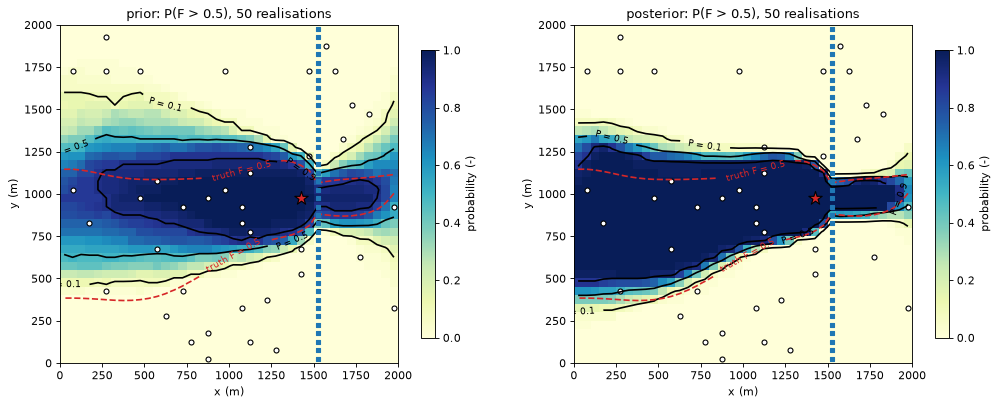
The dashed red line is the truth’s \(F = 0.5\) contour. The white circles are the head observation cells.
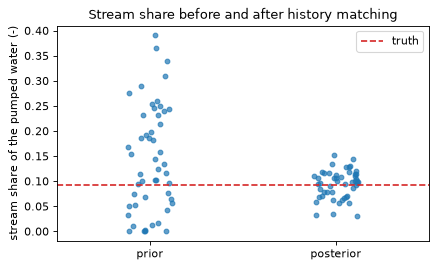
History matching narrows the capture probability of the prior of section 1. The cells captured in at least 90 % of the realisations cover 0.56 km² in the prior and 0.97 km² in the posterior. The band where the realisations disagree (0.1 < P < 0.9) shrinks from 1.08 to 0.36 km². The stream share narrows too. Its 5 to 95 % range is 0.000 to 0.326 in the prior and 0.044 to 0.133 in the posterior. The truth’s stream share, 0.092, lies inside both ranges.
Narrower is not the same as right. This example is synthetic, so we can check the probability maps against the truth (the last three columns of the table):
The posterior gives P ≥ 0.5 to 94 % of the true zone. The prior gives it to 78 %.
The area of the true zone with P < 0.1 falls from 0.062 to 0.010 km².
The confident core (P ≥ 0.9) is larger in the posterior, but hardly more often right. In the prior 85 % of the core lies inside the true zone, in the posterior 88 %. So about an eighth of the posterior core lies outside it.
One synthetic case does not show how reliable such posteriors are in general. A real study would add flow data, more uncertain parameters (recharge, streambed conductance) and checks of the prior. The trace step stays the same: rerun the posterior realisations and pass their folders to gs.run_ensemble.
Capture outputs inside the forward run#
The trace can also run inside forward_run.py, after MF6. The forward run then writes capture outputs, such as the stream share or \(F\) in a cell of interest, as extra observations. With a weight of 0 they are forecasts: IES reports their prior and posterior distribution without fitting them. A non-zero weight makes IES fit them, which only makes sense for measured values (for example a stream-water share from isotopes). This tutorial traces afterwards instead because importing gwsource (and FloPy with it) takes longer than the whole forward run of this small model.
10. Sanity checks#
The mean over realisations of the area with \(F > t\) must equal the area-weighted sum of \(P(F > t)\), because both count the same cells. This holds for the prior of section 1 and for the posterior of section 9. The ensemble mean of \(F\) must lie between its minimum and maximum. Every realisation pumps 800 m³/d.
for label, item in hm.items():
    for t in THRESHOLDS:
        from_probability = float(item["ens"].exceedance[t]["fraction_through"][GROUP] @ area) / 1e6
        from_realisations = item["table"][f"area F>{t} (km2)"].mean()
        print(f"{label}, F > {t}: sum P x area = {from_probability:.4f} km2, "
              f"mean area over realisations = {from_realisations:.4f} km2")
        assert abs(from_probability - from_realisations) < 1e-9
    stats = item["ens"].stats
    mean_f = stats["mean"]["fraction_through"][GROUP]
    assert np.all(stats["min"]["fraction_through"][GROUP] <= mean_f + 1e-12)
    assert np.all(mean_f <= stats["max"]["fraction_through"][GROUP] + 1e-12)
    assert np.allclose(item["ens"].group_inflow[GROUP], 800.0)
print(f"total notebook runtime: {time.perf_counter() - NOTEBOOK_START:.0f} s")
prior, F > 0.1: sum P x area = 1.6212 km2, mean area over realisations = 1.6212 km2
prior, F > 0.5: sum P x area = 1.1276 km2, mean area over realisations = 1.1276 km2
posterior, F > 0.1: sum P x area = 1.6304 km2, mean area over realisations = 1.6304 km2
posterior, F > 0.5: sum P x area = 1.1440 km2, mean area over realisations = 1.1440 km2
total notebook runtime: 73 s
Key points#
gs.run_ensembletraces many realisations of one grid (one folder each) and keeps streaming statistics: min, max, mean, exceedance probabilities and quantiles. It works for any per-cell output, including travel times when a porosity is given.The capture probability \(P(F > 0.5)\) maps the chance that a cell lies in the advective capture zone. \(P(F > 0.1)\) adds the conservative margin for numerical mixing. Protection zones can be drawn at an explicit risk level.
Quantile maps are per cell, not realisations. Exact quantiles keep a float32 stack, whose memory grows with the number of realisations. Histogram quantiles have a fixed memory and an error of at most one bin width.
Parallel runs (
max_workers > 1) give bit-identical statistics. They need process pools and pay off when a realisation takes seconds.For this prior ensemble, the parameter spread of the shares and the zone size is much larger than the change from full mixing to face routing. The parameter spread also blurs the zone edge more than full mixing does.
History matching with PEST++ IES conditions the pilot-point K ensemble on head data. Tracing the posterior realisations with the same code gives a capture probability and a stream share that are conditioned on those data. PEST++ keeps no output per realisation, so the posterior realisations are rerun, one folder each, before the trace.
Narrower is not the same as right. In this synthetic case the posterior core is larger, but the share of it inside the true zone hardly improved. Check a posterior against independent data where you can.
Next#
10 · Unit concentration: the Bedekar et al. (2024) unit-concentration example rebuilt in MF6, tracked forward and backward, and compared with MF6 GWT and the published figure.
References#
Chowdhury, M.A. 2016. Assessing the connectivity of groundwater wells to surface-water using a volumetric capture delineation tool. MASc thesis, University of Waterloo.
White, J.T. 2018. A model-independent iterative ensemble smoother for efficient history-matching and uncertainty quantification in very high dimensions. Environmental Modelling & Software 109: 191–201.